How to Verify Emails in QuickMail
QuickMail is a cold email sending platform, so campaign quality depends on the prospect addresses you bring into it. Verifying your prospect list before a campaign keeps bounces from undermining QuickMail's deliverability work and helps you stay inside healthy bounce rate benchmarks. This guide shows you how to export QuickMail prospects to CSV, clean them with VeriMails, and re-import only deliverable contacts.
TLDR
- Export the specific prospect group or Journey audience you plan to send, not the whole workspace by default.
- QuickMail exports arrive by email; download the ZIP, extract the CSV, and keep Email plus personalization attributes.
- Verify the CSV in VeriMails before adding prospects to a live campaign.
- Import valid rows only, then check QuickMail's import report before turning the campaign on.
- Keep catch-all, disposable, role-based, and invalid rows outside the main campaign audience.
QuickMail Export Decisions
QuickMail workflows are campaign-driven, so the export should match the audience you are about to send or relaunch.
| Decision | Best operating choice | Why it matters |
|---|---|---|
| Export source | Use the Prospects list for a broad cleanup or a Journey export for campaign-specific context. | Keeps active campaign rows separate from general database hygiene. |
| File handling | Download the emailed ZIP and extract the CSV before upload. | VeriMails needs the actual CSV, not the compressed file. |
| Columns to keep | Email, company, campaign, tags, and custom attributes used by templates. | Preserves QuickMail personalization and lets you reconcile the import report. |
| Import check | Review the QuickMail import report for accepted, skipped, duplicate, and invalid rows. | Confirms the clean file actually became the campaign audience you expected. |
| Send gate | Start or resume the campaign only after valid rows are loaded and review rows are excluded. | Protects sender rotation and deliverability monitoring from avoidable bounces. |
Why Verify Your QuickMail Contacts
QuickMail focuses on one job and does it well: getting cold email delivered. It monitors deliverability and helps operators manage sending accounts. The address-quality step still happens before import. If the prospect list is stale, QuickMail will discover that through bounces unless you verify the list first.
QuickMail depends on the addresses you import
Every prospect you import should be treated as send-ready before it reaches a campaign. If the address is dead, QuickMail will still attempt to send to it, and the message will hard bounce. Pairing QuickMail with a dedicated verifier gives operators the pre-send gate that keeps those bounces out.
Bounces work directly against QuickMail's deliverability features
QuickMail analyzes hundreds of data points daily and will swap a declining sender for a stronger one to protect performance. A high bounce rate from an unverified list is exactly the kind of damage that triggers those swaps. Rather than letting QuickMail react to bounces after they occur, verify the list first so the bounces never happen and QuickMail's senders stay healthy.
Prospect data drifts out of date between sourcing and sending
Prospects loaded into QuickMail from a data provider, event list, CRM export, or older outbound file were often valid when sourced but can quietly go stale. An address that worked last quarter can bounce this quarter. Verifying right before the campaign launch catches that drift.
Catch-all and disposable addresses distort your campaign metrics
A large share of B2B domains are catch-all, accepting every address whether or not a real mailbox exists. QuickMail cannot tell a catch-all from a confirmed inbox. Imported lists can also include disposable addresses that should never enter a campaign. Verification flags both so your open and reply rates reflect real recipients rather than phantom ones.
What VeriMails Checks
VeriMails runs every prospect from your QuickMail export through a layered set of checks, each one targeting a different category of bad email, and returns a clear status for each prospect rather than a vague score. The email verification guide explains how those checks work before a campaign send.
It starts with syntax validation to catch malformed addresses, which are common in manually assembled lead files. MX and DNS checks then confirm the domain exists and is configured to receive mail. A live SMTP handshake opens a real connection with the receiving mail server and confirms the specific mailbox will accept a message, without ever sending one, so your prospects see nothing. This is the verification step QuickMail does not provide.
VeriMails also runs catch-all detection to identify domains that accept all addresses, disposable detection to flag throwaway inboxes that imported lists often carry, and role-based detection to surface generic addresses like info@ or sales@. Catch-all status is reported as a clear detection result, never a vague rating. Across all of these checks VeriMails returns clear verification results that work well in live workflows.
Pricing for QuickMail Users
Verification is priced to make pre-send cleanup practical for QuickMail users. VeriMails credits start at $0.0019 per email, so a 10,000-prospect list costs about $19 on the entry pack. Credit packs scale up to 5 million verifications for $1,499, and credits never expire, so an unused balance carries forward to your next campaign.
If you run campaigns on a steady cadence, annual plans start at $12.50/month when billed yearly. Every new VeriMails account includes 100 free credits with no credit card required, enough to verify a small prospect list and see the result before committing. The best habit is to verify every prospect list immediately before you import it into a QuickMail campaign.
Workflow Visual
Use this flow to clean QuickMail prospects before they move into a campaign.
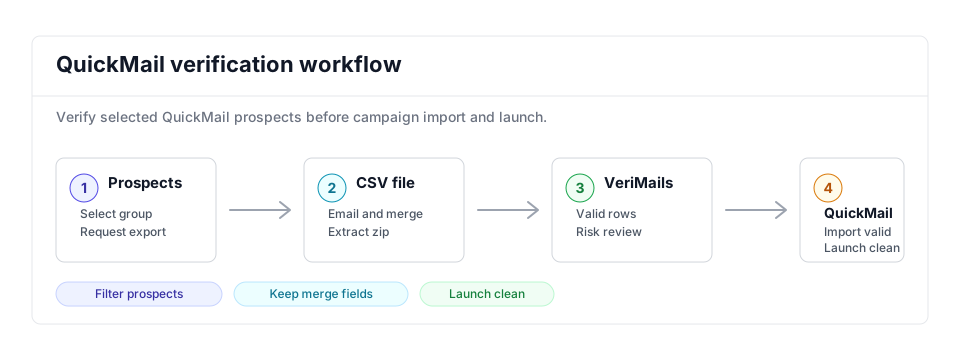
- Export scope: Select or filter the prospect group tied to the campaign before requesting the export; similar cold email prep appears in the Woodpecker guide.
- Matching field: Keep email, company, and personalization fields needed by the campaign import while bulk verification runs.
- Result action: Import valid prospects and review catch-all, role-based, or disposable rows before any sequence starts or campaign metrics are judged against bounce-rate targets.
Step-by-Step
Select prospects in QuickMail and request the export
In QuickMail, open the Prospects list page and select the prospects you want to verify, filtering first if you only need a subset. Click the Action button and choose Email me as CSV. You can also export Journeys from inside a campaign to capture prospects currently running a sequence. QA the selection by checking tags, campaign membership, and the visible prospect count before requesting the export.
Download and extract the export from your email
QuickMail processes the export in the background and emails you a link when it is ready. Click the link to download a ZIP file, then extract it to get the prospect CSV. No reformatting is needed because VeriMails reads the file exactly as it is. Open the CSV once to confirm the email column, personalization fields, row count, and encoding before upload.
Upload the prospect CSV to VeriMails for bulk verification
Sign in to VeriMails, open bulk verification, and upload the QuickMail CSV. VeriMails automatically detects the email column, so there is no manual mapping. Confirm the mapped column before the queued job runs through syntax, MX, DNS, SMTP, catch-all, disposable, and role-based checks. For automated list ingestion, the Email Verification API can run the same gate before QuickMail import.
Review the valid, invalid, catch-all, and risky results
VeriMails sorts every address by status. Valid addresses are safe to contact. Invalid addresses would hard bounce and should be removed before the campaign starts. Catch-all results are flagged so you can decide whether to include them. Disposable and role-based addresses appear separately. Download the filtered valid results, then review status rates by tag or lead source before deciding what to suppress permanently.
Re-import the cleaned list into QuickMail
Open your QuickMail campaign and import prospects from the verified CSV. QuickMail maps the columns to prospect attributes during import and produces an import report. Check accepted, skipped, duplicate, and invalid rows in that report before turning the campaign on. With only verified prospects in the campaign, the bounce rate stays low and your sending accounts stay protected.
What to Do With Each Result
QuickMail imports should be strict. Keep the main campaign limited to addresses that passed verification.
- Valid Import into the campaign and confirm the row appears in the import report.
- Invalid Exclude and clean up the source list before the next export.
- Catch-all Keep in a small monitored segment only when the account value justifies the risk.
- Disposable Remove from campaigns because the inbox is temporary.
- Role-based Review manually; shared inboxes usually need different copy and volume.
Frequently Asked Questions
Related Guides
Try VeriMails Free
100 free credits on signup. No credit card required. Put this guide into practice today.
Start Free