How to Verify Emails in Outreach
Outreach runs your sequences at scale, which means a single batch of bad addresses can produce hundreds of bounces in minutes. Because hard bounces erode the sender reputation that every sequence depends on, the safest move is to verify a prospect list before you load it into Outreach. This guide walks through exporting prospects to CSV, cleaning them with VeriMails, and re-importing only deliverable contacts.
TLDR
- Select the Outreach prospects you intend to enroll, then use More Options > Export.
- Use Download now only for small exports; choose Email CSV for larger files because it supports up to 100,000 prospect records.
- Keep prospect identity fields, email, company, owner, sequence context, and opt-out fields in the file.
- Verify the CSV in VeriMails, then import only valid rows back into Outreach before sequence enrollment.
Prospect Export Decisions
Outreach gives operators two CSV delivery methods. Pick the right one before verification so the file is complete, auditable, and ready for a safe import.
| Decision | Use this option | Operator note |
|---|---|---|
| Small sample | Download now | Use only when the selected prospect count is within the immediate download limit. |
| Full sequence list | Email CSV | Use for sizeable exports; Outreach processes it in the background and emails the completed CSV. |
| Columns to keep | Email, name, company, title, owner, sequence/list fields, and opt-out status. | Keeps import mapping and compliance review connected to the prospect record. |
| Before import | Split VeriMails results by status and import only valid rows into the sequence-ready list. | Prevents risky statuses from blending back into the same enrollment queue. |
| After import | Add a verified date/status field or list tag if your Outreach workspace supports it. | Makes the cleanup visible to reps and sales operations later. |
Why Verify Your Outreach Contacts
Outreach is built to send a lot of email reliably and on schedule. That strength becomes a liability when the underlying prospect data is unverified. A sequence does not pause to ask whether an address is real. It sends, and if the mailbox does not exist the message hard bounces. The faster and more automated your sending, the more important it is that the list going in is clean.
Sequences amplify bad data instead of catching it
When you enroll prospects into an Outreach sequence, the platform fires emails on the cadence you set without re-checking each address. If 8 percent of a list is invalid, roughly 8 percent of every step bounces, step after step, across the whole sequence. Verifying before enrollment removes those addresses once, so they never bounce at all rather than bouncing repeatedly.
Prospect data ages between the day you sourced it and the day you send
Prospects imported into Outreach from a CRM sync, an enrichment tool, or an older list were often valid when sourced but may have gone stale before sequence launch. People change companies, roles, and mail systems while old prospect records remain selectable. Verifying right before enrollment catches that drift.
Bounce rate is a reputation signal that follows your domain
Mailbox providers treat repeated bounces as a proxy for list quality. When an Outreach sequence sends to stale prospects, the bounce history follows the same domain and mailboxes used for other campaigns. Verification is the most direct way to keep obvious bad addresses out before the cadence starts.
Catch-all and role-based addresses inflate sequence reach without delivering it
A large share of B2B domains are configured as catch-all, accepting every address whether or not a mailbox exists. Outreach has no way to tell a catch-all from a confirmed inbox, so those prospects look like real reach. Role-based addresses such as info@ or sales@ rarely reach a decision-maker. Verification labels both so you can decide how to enroll them.
What VeriMails Checks
VeriMails examines every prospect address from your Outreach export through a sequence of layered checks, each catching a different failure mode, and returns a definite status rather than a fuzzy score.
Verification opens with syntax validation to catch malformed addresses and import typos. MX and DNS checks then confirm the domain exists and is set up to accept mail. A live SMTP handshake connects to the receiving mail server and confirms the specific mailbox will accept a message, all without sending one, so your prospects see nothing.
VeriMails also runs catch-all detection to identify domains that accept every address, disposable detection to flag temporary inboxes, and role-based detection to surface generic addresses like admin@ or support@. Catch-all status is reported as a clear detection result, never a vague rating, so you keep full control over those prospects before they enter Outreach.
Pricing for Outreach Users
Verification pricing is built to fit the rhythm of a sales team that loads new prospect lists regularly. VeriMails credits start at $0.0019 per email, so a 10,000-prospect list costs about $19 on the entry pack. Credit packs scale up to 5 million verifications for $1,499, and credits never expire, so an unused balance carries forward to your next sequence launch.
For teams running a steady stream of new lists, annual plans start at $12.50/month when billed yearly. Every new VeriMails account includes 100 free credits with no credit card required, which is enough to verify a small prospect export and see the result for yourself before you commit. A good operating habit is to verify every prospect list immediately before enrolling it in an Outreach sequence.
Workflow Visual
Outreach sequence quality depends on the list before enrollment. Export the prospects you intend to contact, verify the CSV, then load only deliverable addresses into the sequence.
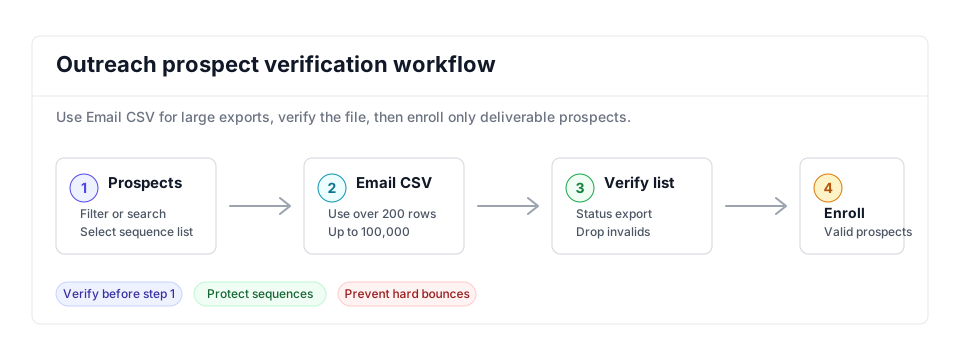
- Sequence readiness: Follow the cold email verification playbook before enrolling prospects.
- Large exports: Outreach's emailed CSV flow pairs cleanly with bulk verification for high-volume sequence preparation.
- Sales engagement stack: Compare this with the Salesloft and Apollo.io workflows when prospects move across tools.
Step-by-Step
Select prospects in Outreach and open the export menu
Log in to Outreach and click the Prospects icon in the navigation sidebar. Use filters or search to narrow to the prospects you intend to contact, then tick their checkboxes. Click the three-dot More Options icon and choose Export from the dropdown.
Choose the right export delivery method
Outreach offers two options. Download Now returns a CSV immediately but is capped at 200 prospect records. Email CSV processes the export in the background and emails you the file, handling up to 100,000 records. For any list larger than 200 prospects, choose Email CSV and retrieve the file from your inbox.
Upload the prospect CSV to VeriMails for bulk verification
Sign in to VeriMails, open bulk verification, and upload the Outreach CSV. VeriMails automatically detects the email column, so there is no mapping step. The job runs as a queued bulk verification while the syntax, MX, DNS, SMTP, catch-all, disposable, and role-based checks run.
Review the valid, invalid, catch-all, and risky results
VeriMails sorts every address by status. Valid addresses are safe to enroll. Invalid addresses would hard bounce and should be dropped. Catch-all results are flagged so you can decide whether to include them. Disposable and role-based addresses appear separately. Download the filtered set of valid results for your Outreach import.
Re-import the cleaned list into Outreach
Use the Outreach bulk CSV import to create or update prospects from the verified file. Map the email column and any name, title, or company fields during import. With only verified addresses entering your sequences, the bounce rate stays low and your sender reputation stays protected.
What to Do With Each Result
Sequence enrollment should happen only after the result file is split. Keep the Outreach import file narrow and intentional.
- Valid Import and enroll when the prospect still matches the campaign criteria.
- Invalid Exclude from the import and mark the source record for data cleanup outside the sequence.
- Catch-all Route to a smaller review segment. Do not mix with confirmed-valid prospects in bulk enrollment.
- Disposable Drop from sequences because the inbox is temporary and unlikely to support a sales process.
- Role-based Review manually; generic inboxes may fit account research but should not receive person-level sequence copy by default.
Frequently Asked Questions
Related Guides
Try VeriMails Free
100 free credits on signup. No credit card required. Put this guide into practice today.
Start Free