How to Verify Emails in Apollo.io
Apollo.io is a powerful prospecting database, but a CSV export is still a point-in-time list that should be checked before it enters a sequence. Apollo lets you export saved contacts, choose which email fields and custom fields are included, and import contacts back from CSV. This guide shows you how to use that workflow with VeriMails so the sequence-ready list is built from recently verified-valid rows instead of the raw export.
TLDR
- Open Search > People or a saved list, select the contacts, and export them to CSV.
- Use Apollo's export settings to include Email, name, company, list, owner, and any custom fields you need during re-import.
- Saved contact exports do not require Apollo credits, and large exports may take time before the Download action appears.
- Verify the CSV in VeriMails, then import valid rows back into Apollo as a cleaner list for sequence review.
- Split large Apollo import files into smaller files if the contact CSV is getting unwieldy.
Apollo Export Decisions
The export dialog is where most cleanup mistakes happen. Decide the exact list, email scope, and return columns before the file leaves Apollo.
| Decision | Best operating choice | Why it matters |
|---|---|---|
| Export source | Use a saved list, saved search, or filtered People view that matches the next sequence. | Prevents a broad export from turning into an unfocused sending list. |
| Email scope | Export all selected emails when you want VeriMails to return one consistent verification result set. | Gives one verification layer a consistent view of every row instead of mixing pre-filtered and unfiltered records. |
| CSV fields | Include Email, First Name, Last Name, Company, title, list name, owner, and useful custom fields. | Apollo warns that emails and phone numbers can be blank if those fields are not selected in export settings. |
| Re-import path | Use Import > CSV in People and map the email and identity fields carefully. | Apollo can update an existing contact when a row matches, so the clean file should carry stable identity fields. |
| Sequence readiness | Create a new clean list or update the original list only after invalid and risky rows are removed. | Leaves the raw export auditable and gives sales reps a clear list to enroll. |
Why Verify Your Apollo.io Contacts
Apollo is a sales prospecting platform with built-in export and import workflows, which makes it easy for sales teams to move lists quickly. That speed is useful, but it also means a prospecting list can go from search results to a live sequence before anyone has checked which addresses are strong send candidates and which ones need review. An independent verification pass gives operators a clean gate between sourcing and sending.
The Verified label and a mailbox-level check are not the same thing
Apollo lets you export only verified emails or all selected emails. Either way, the exported CSV should be treated as a working file rather than the final send list. An address can change after it was saved, and a catch-all domain can still accept mail without confirming the person-specific mailbox. VeriMails performs a fresh deliverability check on the actual CSV you plan to use.
Catch-all domains can create surprise bounces
Catch-all domains accept mail broadly at the domain level, which means the server may not confirm whether a specific person mailbox exists. VeriMails explicitly labels catch-all results so they do not blend into the confirmed-valid export. Operators can then keep those contacts in a cautious segment instead of treating them like the lowest-risk addresses in the list.
Database data decays between the day Apollo verified it and the day you send
Sales teams often save Apollo contacts, wait for a campaign window, enrich the list, and then export later. During that gap, people change roles, companies update domains, and old campaign lists get reused. Verifying the export immediately before a campaign launch checks the address as it stands right now, not as it stood when the contact was first saved.
Bounces from Apollo lists can affect the reputation of your sending domain
Apollo exports often feed cold sequences, so invalid addresses can become sender-reputation problems in the tool that actually sends the emails. Mailbox providers read repeated bounces as a list-quality signal and may filter future messages more aggressively. Verifying first helps keep likely invalid addresses out of the sequence and gives reps a cleaner list to work.
What VeriMails Checks
VeriMails puts every address from your Apollo export through a layered set of checks, each one catching a different class of bad email, and returns an actionable status for each contact rather than a vague score.
It begins with syntax validation to catch malformed addresses. MX and DNS checks then confirm the domain exists and is configured to accept mail. The live SMTP handshake is especially useful for Apollo exports: it opens a real connection with the receiving mail server and checks whether the specific mailbox appears able to accept a message, without ever sending one. This can flag addresses that were saved as Verified but may still bounce later.
VeriMails also runs catch-all detection to identify domains that accept all addresses, plus disposable detection for throwaway inboxes and role-based detection for generic addresses like info@ or sales@. Catch-all status is reported as a clear detection result, never a vague rating. Across all of these checks VeriMails returns clear verification results that work well in live workflows.
Pricing for Apollo.io Users
Verification is priced so that adding a real SMTP check on top of an Apollo export has a predictable per-email cost. VeriMails credits start at $0.0019 per email, which is $19 for a 10,000-credit pack. Credit packs scale up to 5 million verifications for $1,499, and credits never expire, so a balance you buy now carries forward to your next Apollo export.
If you export from Apollo on a steady cadence, annual plans start at $12.50/month when billed yearly. Every new VeriMails account also includes 100 free credits with no credit card required, which is enough to verify a small Apollo list and see which Verified-labeled addresses return as catch-all, invalid, or review-needed. A practical habit is to run every Apollo export through VeriMails immediately before loading it into a sequence.
Workflow Visual
Apollo is best treated as the sourcing layer, not the final verification gate. Export the saved list, let VeriMails perform mailbox-level checks, then import the verified-valid subset into Apollo or your sequencing tool.
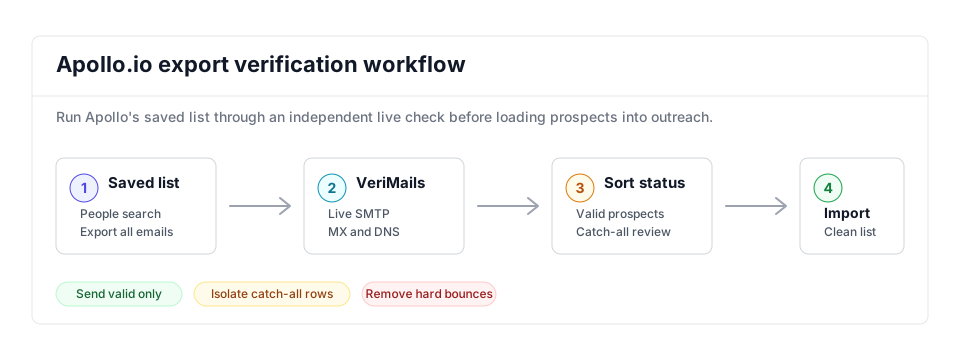
- Lead quality: Use this workflow with the lead verification use case when sourcing new prospect lists.
- Cold outreach: Before sequences launch, pair Apollo exports with the cold email verification workflow.
- Catch-all control: Apollo lists often need explicit catch-all detection before import into Outreach, Salesloft, or Smartlead.
Step-by-Step
Open your list in Apollo and start the export
In Apollo, click Lists and open the saved list you want to clean, or go to Search and People and apply filters to build the set. Select contacts with the checkboxes or use bulk selection, then click Export. Exporting contacts already saved to a list does not consume Apollo export credits.
Choose export options and download the CSV
In the export dialog, choose whether to export all emails or only verified emails. Export all emails when you want VeriMails to evaluate every selected address in one pass. Optionally click Edit export CSV settings to adjust which columns are included, then click Export records and download the file.
Upload the Apollo CSV to VeriMails for bulk verification
Sign in to VeriMails, open bulk verification, and upload the Apollo CSV. VeriMails automatically detects the email column, so there is no manual mapping. The job runs as a queued bulk verification while the syntax, MX, DNS, SMTP, catch-all, disposable, and role-based checks run.
Review the valid, invalid, catch-all, and risky results
VeriMails sorts every address by status. Valid results are the best candidates for outreach when consent and policy checks also pass. Invalid results are likely to hard bounce and should stay out of sequence-ready lists, even if Apollo marked them Verified. Catch-all results are flagged so you can decide whether to include them. Disposable and role-based addresses appear separately. Download the filtered valid results.
Re-import the cleaned list into Apollo
Use Apollo's Import a CSV of Contacts flow to bring the verified file back in. Map the email column and any name or company fields during import. You can update the existing list or create a fresh clean list so sequences can pull from recently verified-valid addresses instead of the raw export.
What to Do With Each Result
Use the VeriMails result to decide what gets imported back into Apollo and what stays in a review file. This helps keep the cleaned list useful for sequences instead of simply producing another spreadsheet.
- Valid Import into Apollo and add to the clean list for sequence enrollment or CRM sync.
- Invalid Do not import into the sequence-ready list, even if the row came from a saved Apollo contact.
- Catch-all Keep in a separate list for cautious, low-volume outreach or account-owner review.
- Disposable Drop from outbound campaigns because the inbox is temporary and unlikely to represent a durable prospect.
- Role-based Review before use; generic inboxes need different handling than named prospects.
Frequently Asked Questions
Related Guides
Try VeriMails Free
100 free credits on signup. No credit card required. Put this guide into practice today.
Start Free