How to Verify Emails in Folk
Folk is a relationship-first CRM, and the contacts in your groups are only as useful as the email addresses attached to them. Because B2B contact data decays at roughly 30 percent a year, even a recently enriched Folk group can hold addresses that no longer accept mail. This guide shows you how to export a Folk group, verify every address with VeriMails, and re-import a clean, deliverable list.
TLDR
- Open the Folk group or filtered view that matches the next relationship, recruiting, or outbound workflow.
- Show Email, name, company, owner, source, tags, and any custom fields before exporting because the view controls the CSV columns.
- Unzip the export and verify the contacts CSV, not the notes CSV.
- Import valid rows back into the right group and map email plus name fields so existing contacts merge cleanly.
- Keep invalid and disposable contacts out of sequences; review catch-all and role-based contacts before sending.
Group Export Setup
Folk groups behave like working lists, so set the view up for the operator who will use the cleaned contacts after verification.
| Setup choice | What to do in Folk | Operator note |
|---|---|---|
| Export source | Open the exact group or filtered view that will feed the next sequence, shared list, or relationship workflow. | Folk exports the current view, so the filter is the practical boundary of the cleanup. |
| Visible columns | Show Email, name, company, role, owner, source, tags, status, and any custom fields used for personalization. | Only useful columns should travel through verification and back into the group. |
| Zip contents | Extract the download and use the contacts CSV for verification; keep the notes CSV untouched for reference. | The contacts file carries the email column VeriMails needs. |
| Import target | Import the verified file into the same Folk group or a new clean group for send-ready contacts. | A new clean group gives operators a clear boundary before outreach starts. |
| Merge fields | Map email, first name, last name, company, and any custom fields that should be updated. | Good mapping prevents duplicate contacts and preserves relationship context. |
Why Verify Your Folk Contacts
Folk does an excellent job of pulling contacts together from LinkedIn, your inbox, and shared team groups, then enriching each record with company and role data. What Folk does not do is confirm that an email address is still live on the receiving mail server. Enrichment tells you what an address probably is. Verification tells you whether a message sent to it will actually be delivered. Those are two different questions, and only one of them protects your sending reputation.
Contact data in Folk goes stale faster than most teams expect
Around 15 to 20 percent of professionals change jobs every year. When someone leaves a company, the work email in your Folk group usually stops accepting mail within weeks. If you built a group six months ago and have not re-checked it, a meaningful slice of those addresses may already be unreachable. Sending to them produces hard bounces, and hard bounces are the single fastest way to damage a sending domain.
Folk groups are often assembled from mixed sources
A typical Folk group blends LinkedIn imports, manually added contacts, CSV uploads from events, and records synced from Gmail or Outlook. Each source carries its own error rate. LinkedIn-derived emails are often unconfirmed before verification. Event lists are full of typos written on a badge scanner. Verifying the whole group before any outreach normalizes that mixed quality into a single trustworthy list.
Bounces quietly suppress deliverability for your good contacts too
Mailbox providers read bounce patterns as a signal of list quality. A bounce rate above 5 percent tells Gmail and Outlook that you are working from an unclean list, and they respond by routing more of your mail to spam, including messages to perfectly valid recipients. One neglected Folk group can drag down deliverability for every other group you contact. Keeping bounces under 3 percent keeps your domain in good standing.
Catch-all and role-based addresses distort your group counts
Plenty of Folk contacts carry catch-all domains, where the mail server accepts every address whether or not a real mailbox exists. Others are role-based addresses such as info@ or team@. Both inflate the apparent size of a usable group while adding little real reach. Verification flags them so you can decide how to treat them rather than discovering the problem after a campaign underperforms.
What VeriMails Checks
VeriMails runs every address from your Folk export through a layered set of checks, each one designed to catch a different category of bad email. The result is a clear status for every contact rather than a vague score.
The checks begin with syntax validation, which catches malformed addresses and the typos that creep into manually added Folk contacts. Next come MX and DNS checks, which confirm the domain exists and is configured to receive mail at all. A live SMTP handshake then opens a real conversation with the receiving mail server to confirm the specific mailbox will accept a message, without ever sending one.
On top of that, VeriMails performs catch-all detection to identify domains that accept all addresses, disposable detection to flag throwaway inboxes that should never enter a CRM, and role-based detection to surface generic addresses like sales@ or admin@. Catch-all status is reported as a clear detection result so you can apply your own judgement to those contacts. Across all of these checks VeriMails returns clear verification results that work well in live workflows.
Pricing for Folk Users
Verification is priced so you can clean a Folk group without thinking twice about cost. Credit packs start at $0.0019 per email, which works out to $19 for a 10,000-credit pack. Larger credit packs scale up to 5 million verifications for $1,499, and every credit pack you buy stays valid permanently because credits never expire. That suits the bursty way Folk teams actually work, where you might verify one group this month and a different one next quarter.
If your verification needs are steadier, annual plans start at $12.50/month when billed yearly. Every new VeriMails account also includes 100 free credits, with no credit card required, so you can export a small Folk group and run it through the verifier before deciding on a plan. A practical habit is to re-verify each active Folk group every 60 to 90 days, which keeps pace with normal contact-data decay.
Workflow Visual
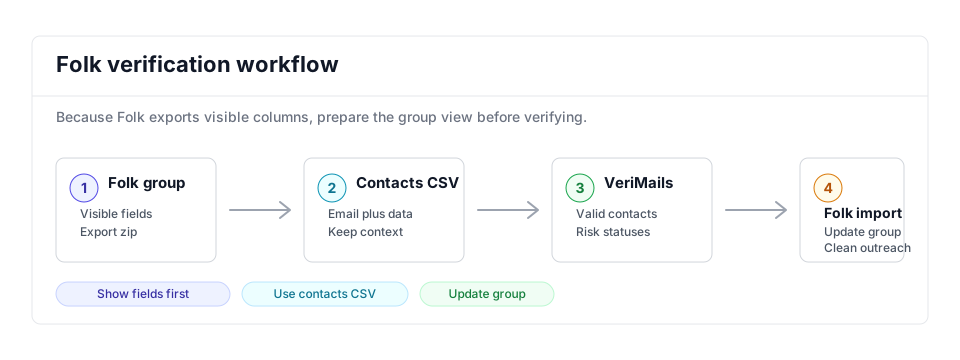
Use this flow when a Folk group needs verified contacts and clean import matching.
- CRM hygiene: Use this export path as part of a recurring CRM hygiene routine.
- Sales outreach: Pair clean Folk groups with the sales verification workflow before campaigns.
- Adjacent CRMs: Compare with Attio and Copper if contacts move between tools.
Step-by-Step
Display the fields you want, then export the Folk group as CSV
Open the Folk group you want to clean. Because Folk exports only the columns currently visible in the view, first display every field you care about, especially the email column. Then click the three dots in the top right of the group and choose Export view as CSV. Folk applies any filters in the view, so filter to the exact contacts you intend to contact before exporting.
Unzip the download and locate the contacts CSV
Folk delivers the export as a zip file containing two CSVs, one for contacts and one for associated notes. Extract the zip and set aside the notes file. The contacts CSV holds the email column and is the file you will verify. No reformatting is needed because VeriMails reads the file as-is.
Upload the contacts CSV to VeriMails for bulk verification
Sign in to VeriMails, open bulk verification, and upload the Folk contacts CSV. VeriMails automatically detects the email column, so there is no manual mapping step. The job runs as a queued bulk verification while the syntax, MX, DNS, SMTP, catch-all, disposable, and role-based checks run.
Review the valid, invalid, catch-all, and risky results
When verification completes, VeriMails groups every address by status. Valid addresses are safe to contact. Invalid addresses would hard bounce and should be removed. Catch-all results are flagged so you can decide whether to include them. Role-based and disposable addresses are surfaced separately. Download the filtered set of valid results for your outreach list.
Re-import the cleaned list into the Folk group
Open the target Folk group, click the three dots in the top right, and choose Import CSV. Folk accepts CSV, XLS, XLSX, TSV, and TXT files. Map the email and name columns during import so the verified records merge with the existing contacts. Since Folk imports group by group, repeat for any other groups you cleaned.
What to Do With Each Result
Use the verification result to decide which Folk contacts can stay in active groups and which contacts need owner review.
- Valid Import into the active group, add a verified date, and keep the contact eligible for sequences or relationship follow-up.
- Invalid Remove from send-ready groups and ask the owner to confirm a replacement address.
- Catch-all Keep in a review group and send only when the relationship value justifies a cautious attempt.
- Disposable Exclude from CRM outreach because the inbox is temporary and not a stable relationship record.
- Role-based Keep for company-level routing where useful, but exclude from personalized contact sequences by default.
Frequently Asked Questions
Related Guides
Try VeriMails Free
100 free credits on signup. No credit card required. Put this guide into practice today.
Start Free