How to Verify Emails in Attio
Attio keeps an email address on every Person record and enriches contacts automatically from your connected inbox, but the platform never confirms that the address still reaches a live mailbox. People created from email syncs, records pushed in by the API, contacts captured by automations, and rows imported from an older CRM all sit in your workspace looking ready to email until a campaign reveals how many bounce. This guide shows you how to export an Attio People view to CSV, verify it with VeriMails, and re-import a clean list so your outreach stays deliverable.
TLDR
- Build a People view for the exact segment you plan to message, sync, or clean.
- Show Email, Record ID, owner, source, lifecycle stage, and any list fields needed for the return import.
- Export the visible view to CSV, verify the CSV in VeriMails, then download results with status and date columns.
- Import the verified file back to the People object and match on Record ID or Email so existing records are updated.
- Keep invalid, disposable, and role-based rows out of sending workflows; route catch-all rows to a review list.
People View Setup
Attio exports the current view, so the quality of the export depends on the filters and columns you set before clicking Export view as CSV.
| Setup choice | What to do in Attio | Operator note |
|---|---|---|
| Export scope | Open People or a saved list, then apply filters for owner, list membership, lifecycle stage, last contacted date, or campaign source. | Verify the group that will actually be used next instead of exporting every Person in the workspace. |
| Visible columns | Show Email, Record ID, name, company, owner, source, list, and any custom attributes your team uses for segmentation. | Attio exports visible columns, so add the matching and audit fields before downloading the file. |
| Match key | Keep the Record ID column when possible, with Email as the fallback unique attribute for People. | The import can update existing People records cleanly when the return file carries a stable identifier. |
| Verification fields | Add or map fields such as verification status, verified at, and verification source during the return import. | Those fields let operators filter Attio directly rather than relying on an external spreadsheet. |
| Review list | Create a saved list for catch-all, role-based, and invalid rows after import. | Reps can resolve uncertain records without sending to them by accident. |
Why Verify Your Attio Contacts
Attio is a modern, data-driven CRM that builds much of your contact graph automatically. By syncing connected inboxes and calendars, Attio creates and enriches People records from the activity it observes, and that automation is exactly why the People object accumulates addresses nobody ever deliberately checked. Add the developer API, automations, web form captures, and migrations from a previous CRM, and an Attio workspace ends up holding a mix of solid contacts and quietly unreachable addresses.
Attio does not test whether a Person's email works
The email attribute on a Person record holds whatever value Attio captured or you entered. It might be a typo from a manual entry, an address auto-pulled from a single email thread, an abandoned mailbox from an old migration, or an address that was never valid. Attio stores it without ever opening a connection to the mail server to confirm it is reachable. VeriMails runs that live test, so you can see which People records would bounce before you run a sequence or push the list into a sending tool.
Contact data decays faster than automatic enrichment can fix
B2B contact data goes stale at roughly 2.1 percent per month, which compounds to around 22.5 percent a year, and close to 30 percent of B2B records become unreliable within twelve months as people change jobs and companies restructure. A Person added to Attio a year ago from an email thread or an import has a real chance of being unreachable today. Because Attio enriches contacts continuously, it is easy to assume every record is current when the underlying mailbox may have closed months ago. Verifying an export right before outreach reflects the current deliverability of each address.
Bounces damage the sender reputation behind your workspace
When you sync Attio People to a cold outreach platform or an email tool, every invalid address turns into a bounce. Mailbox providers read a high bounce rate as a signal that a list is low quality or purchased, and they respond by routing more of your mail to spam. A bounce rate above 3 percent needs attention, and above 5 percent it does lasting damage to your sending domain. Verifying first keeps bounces low and protects deliverability for every deal in your Attio pipeline.
Clean People data keeps your Attio reports honest
Attio reports, lists, and workflow automations all assume the People you contact can actually receive mail. Unreachable addresses inflate your record count, distort engagement and pipeline metrics, and trigger workflows that fire follow-up steps against people who never received the first message. Because Attio is often the main record system for a fast-moving sales team, verifying the list keeps that record system grounded in contacts who genuinely exist.
What VeriMails Checks
VeriMails runs every address from your Attio export through a layered set of checks. Each layer catches a different category of bad email, and every Person comes back with a definite status rather than a vague score.
It starts with syntax validation to catch malformed addresses, including the typos that slip in through manual entry on a Person record. MX and DNS checks then confirm the domain exists and is configured to receive mail. The live SMTP handshake is the step that matters most: VeriMails opens a real connection to the receiving mail server and confirms the specific mailbox will accept a message, without ever sending one. This is what catches the abandoned mailboxes and departed contacts that Attio still lists as active People.
VeriMails also runs catch-all detection to flag domains that accept every address whether or not a real mailbox exists, disposable detection for temporary throwaway inboxes, and role-based detection for generic addresses such as info@ or sales@. Catch-all status is reported as a clear detection result, never a probability score. Across all of these checks VeriMails returns clear verification results that work well in live workflows.
Pricing for Attio Users
Verification is priced so that cleaning an Attio People list before outreach costs very little against the value of protected deliverability. Credit packs start at $0.0019 per email, which is $19 for a 10,000-credit pack. Credit packs scale up to 5 million verifications for $1,499, and credits never expire, so a balance bought for one campaign carries forward to the next.
If you export and clean Attio data on a regular cadence, annual plans start at $12.50/month when billed yearly. Every new VeriMails account also includes 100 free credits with no credit card required, which is enough to verify a sample of your Attio People and see how many records hold invalid or catch-all addresses before you commit to a plan.
Workflow Visual
Use this flow when Attio lists need a clean People export and a controlled import back into the object.
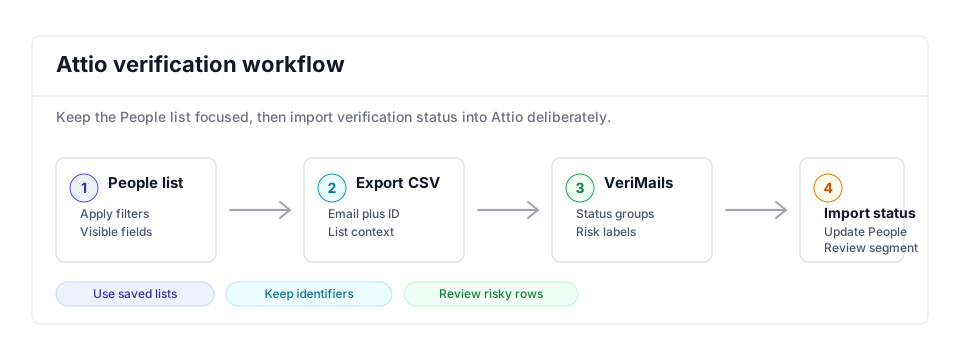
- CRM hygiene: Add Attio exports to a recurring CRM hygiene schedule before major launches.
- Bulk cleanup: Use bulk email verification when a saved People view has hundreds or thousands of addresses.
- Adjacent guides: Compare this flow with Folk and Pipedrive if records move between CRMs.
Step-by-Step
Set up the People view in Attio
In Attio, open the People object or a saved list you want to verify. Apply any filters that narrow the records to the segment you want to clean. Make sure the table view shows every column you need in the export, especially the email address. If you want a reliable matching key for re-import, add the Record ID column too. Click Save for everyone so the export reflects your filters.
Export the People view as CSV
Click Import / Export at the top right of the view and choose Export view as CSV. Every column visible in the table becomes a column in the file. All members can export records, so you do not need admin rights for a standard People export. Attio downloads a ready-to-use CSV, with no conversion step required.
Upload the CSV to VeriMails
Sign in to VeriMails, open bulk verification, and upload the CSV from Attio. VeriMails automatically detects the email column, so there is no manual mapping. The job runs as a queued bulk verification while the syntax, MX, DNS, SMTP, catch-all, disposable, and role-based checks all run.
Review valid, invalid, catch-all, and risky results
VeriMails sorts every address by status. Valid addresses are safe to email. Invalid addresses would hard bounce and should be removed before any send. Catch-all results are flagged so you can decide how to treat them. Disposable and role-based addresses appear separately. Download the filtered valid results as a clean CSV.
Re-import the cleaned list into Attio
In Attio, click Import / Export and choose Import CSV on the People object, then upload the verified file. Map the email column, which is a unique attribute, so Attio matches each row to the existing Person and updates it instead of creating a duplicate. If you exported Record IDs, you can map that as the matching attribute. Use the Review values and Preview import steps to confirm the cleanup before you run it.
What to Do With Each Result
Use the VeriMails result as an Attio operating field so every saved view, workflow, and sync can filter on current deliverability.
- Valid Update the Person, set a verified date, and keep the record eligible for outreach or downstream syncs.
- Invalid Suppress from sending lists and create an owner task to confirm a replacement address.
- Catch-all Keep in a review segment and use only for higher-value accounts with careful send limits.
- Disposable Remove from CRM-driven outreach because the inbox is temporary and unlikely to represent a stable contact.
- Role-based Keep for account-level routing where useful, but exclude from personalized Person sequences by default.
Frequently Asked Questions
Related Guides
Try VeriMails Free
100 free credits on signup. No credit card required. Put this guide into practice today.
Start Free