How to Verify Emails in HubSpot
HubSpot stores every contact you collect, but it does not check whether those email addresses can still accept mail. Old form fills, stale imports, and contacts who have changed jobs quietly build up until a marketing send hits a wall of bounces. This guide shows you how to export a HubSpot contact list to CSV, run it through VeriMails for mailbox-level verification, and re-import a reviewed list that reduces avoidable bounce risk before the next campaign.
TLDR
- Export the exact HubSpot contact view or active list you plan to email, not the whole CRM by default.
- Keep Email, Record ID, First Name, Last Name, Company, and lifecycle fields in the CSV so the cleaned file can update existing records without duplicates.
- Verify the CSV in VeriMails before sending, then use only valid records for campaign enrollment.
- Treat invalid addresses as remove or suppress, and keep catch-all records in a separate segment if you want to test them cautiously.
- Re-import with Email or Record ID as the unique identifier so HubSpot updates existing contacts instead of creating new ones.
Pre-Export Setup Checklist
Before you click Export, decide how the cleaned file will be used when it comes back. HubSpot exports can include only the properties in the current view or a broader set of properties, and Record ID is the safest merge key when you want to update existing contacts.
| Decision | Campaign choice | Why it matters |
|---|---|---|
| Audience scope | Export the active list, saved view, or filtered contact segment that matches the next send. | Keeps verification tied to a real campaign instead of cleaning the entire CRM without a sending plan. |
| Columns to include | Email, Record ID, First Name, Last Name, Company, lifecycle stage, consent fields, and any segment tags. | Gives VeriMails the address to check and gives HubSpot enough identifiers to update the right contact later. |
| Multiple emails | If contacts can have more than one email address, include all email addresses in the export. | Prevents the primary address from looking clean while a secondary address still bounces in a workflow. |
| Re-import target | Import valid rows into a verified list or update existing contacts by Email or Record ID. | Record ID supersedes other identifiers during import and prevents duplicate contact creation. |
| Risk handling | Keep invalid, disposable, and catch-all rows out of the main marketing list. | Separates contacts that need suppression or review from contacts ready for a campaign. |
Why Verify Your HubSpot Contacts
HubSpot is one of the most widely used CRM and marketing platforms, and that breadth is exactly why contact data quality slips. Addresses enter your portal from forms, list imports, sales reps typing notes, chat conversations, and dozens of connected apps. None of those entry points confirm that the address actually accepts mail. Over time a HubSpot database becomes a mix of solid contacts and addresses that no longer receive mail, and you only find out which is which when you press send.
HubSpot does not verify addresses before they enter the CRM
HubSpot can store a typo, an abandoned mailbox, or an incorrect address someone entered to grab a content download. The platform suppresses contacts that have already hard bounced, but that is a reaction, not prevention. By the time HubSpot records a hard bounce, the bounce has already counted against your sending domain. Verifying the list first means unverified addresses are handled before they can bounce.
Contact data decays faster than most teams update it
HubSpot contacts often stay in the CRM long after the moment they entered it. Webinar signups, old imports, and sales-owned contacts can all look ready for a campaign even when the mailbox behind the address has changed or disappeared. Verifying an export immediately before a campaign checks each address as it stands now, not as it stood when the contact first signed up.
Bounces threaten your HubSpot marketing email sending
HubSpot can store and suppress contacts after they hard bounce, but that still means the first failed send has already happened. Mailbox providers read repeated bounces as a list-quality problem and may route more of your future mail to spam, including messages to good contacts. Verifying first keeps the least reliable addresses out of the send and gives your team a cleaner list to use in HubSpot campaigns.
Clean data makes HubSpot reporting and automation trustworthy
Workflows, lead scoring, and lifecycle reporting all assume the contacts they act on are reachable. Unreachable addresses inflate your contact count, skew open and click rates, and trigger automation against people who will never receive the email. Since HubSpot pricing is tied to marketing contact tiers, carrying invalid addresses can also mean paying for contacts who can never be reached. Verifying the list keeps both your reporting and your bill grounded in reality.
What VeriMails Checks
VeriMails runs every address from your HubSpot export through a layered set of checks. Each layer catches a different deliverability issue, and each contact comes back with a definite status rather than a vague score you have to interpret.
It starts with syntax validation to catch malformed addresses, the kind that slip in from manual entry or a broken form. MX and DNS checks then confirm the domain actually exists and is configured to receive mail. The live SMTP handshake is the step that matters most: VeriMails opens a real connection with the receiving mail server and confirms the specific mailbox will accept a message, without ever sending one. This is what catches the abandoned mailboxes and departed employees that HubSpot still lists as active contacts.
VeriMails also runs catch-all detection to flag domains that accept every address whether or not a real mailbox exists, plus disposable detection for temporary inboxes commonly used to grab gated content, and role-based detection for generic addresses such as info@ or support@. Catch-all status is reported as a clear detection result, never a probability score. Across all of these checks VeriMails returns clear verification results that work well in live workflows.
Pricing for HubSpot Users
Verification is priced so that cleaning a HubSpot list before a send is easy to budget. VeriMails credits start at $0.0019 per email, which is $19 for a 10,000-credit pack. Credit packs scale up to 5 million verifications for $1,499, and credits never expire, so a balance you buy for one campaign carries forward to the next.
If you export and clean HubSpot lists on a regular cadence, annual plans start at $12.50/month when billed yearly. Every new VeriMails account also includes 100 free credits with no credit card required, which is enough to verify a sample segment from HubSpot and review invalid, catch-all, or disposable rates before you commit to a plan. If HubSpot cleanup is part of a vendor review, compare list-cleaning workflows in the ZeroBounce comparison and NeverBounce comparison.
The Workflow Preview
The safest HubSpot verification flow is simple: export a real campaign segment, preserve the columns HubSpot needs for matching, verify the file outside the CRM, and import only the cleaned records back into HubSpot.

Step-by-Step
Open the contact list you want to verify in HubSpot
In HubSpot, go to CRM and then Contacts. Open the view or active list you want to clean, or apply filters such as Lifecycle Stage, Create Date, or Last Marketing Email Date to narrow the set. Working from a defined segment keeps the export focused and your verification credits efficient.
Export the list to CSV
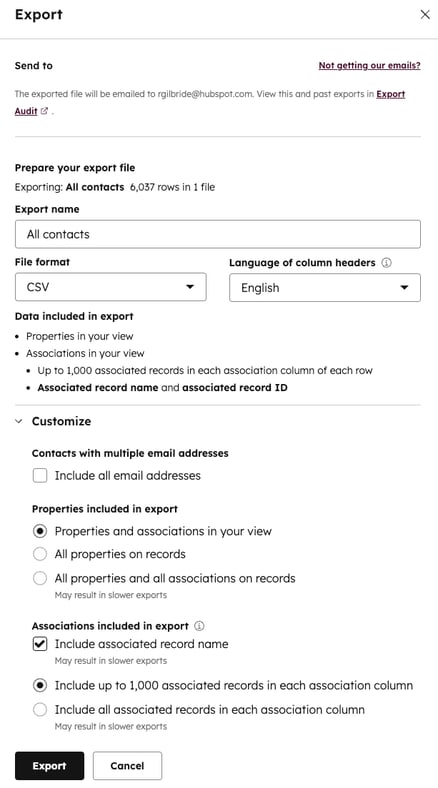
In the top right of the contacts table, click Export. In the dialog, choose CSV as the file format, then use the Customize option to make sure the email property is included along with First Name, Last Name, and Record ID. Click Export. HubSpot emails you a download link, and the link stays valid for 30 days.
Upload the HubSpot CSV to VeriMails
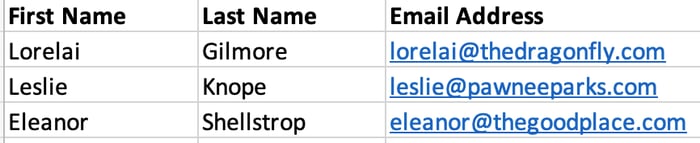
Sign in to VeriMails, open bulk verification, and upload the CSV from HubSpot. VeriMails automatically detects the email column, so there is no manual mapping. The job runs as a queued bulk verification while the syntax, MX, DNS, SMTP, catch-all, disposable, and role-based checks all run.
Review valid, invalid, catch-all, and review-needed results
VeriMails sorts every address by status. Valid addresses are the best candidates for the campaign. Invalid addresses carry high bounce risk and should be removed before any send. Catch-all results are flagged so you can decide how to treat them. Disposable and role-based addresses appear separately. Download the filtered valid results as a clean CSV.
Re-import the cleaned list into HubSpot
Use the HubSpot import tool to bring the verified file back in. Choose Email or Record ID as the unique identifier so HubSpot matches each row to the existing contact and updates it instead of creating a duplicate. You can also load the verified file into a fresh active list so your marketing emails pull from recently checked valid rows.
What to Do With Each Result
The import decision matters as much as the verification run. Do not put every result back into one marketing list. Split the file by status first, then decide how each segment should behave inside HubSpot.
- Valid Use for the campaign, update the HubSpot contact, and optionally add a property such as Email verified date so future workflows know when the address was last checked.
- Invalid Suppress from marketing sends or mark as not marketable. These are the addresses most likely to hard bounce and raise bounce-rate risk.
- Catch-all Keep separate from the valid list and review the catch-all detection result before use. Many B2B domains accept every address during SMTP checks, so send only if the contact is strategically important and the campaign volume is controlled.
- Disposable Remove from lifecycle campaigns, webinars, and nurture lists. Disposable inboxes are usually low intent and often disappear quickly.
- Role-based Review before sales outreach. Addresses such as info@ and support@ can work for operations messages, but they usually underperform for personalized campaigns.
Frequently Asked Questions
Related Guides
Try VeriMails Free
100 free credits on signup. No credit card required. Put this guide into practice today.
Start Free