How to Verify Emails in Kit (formerly ConvertKit)
Kit, the platform creators knew for years as ConvertKit, bills around confirmed subscriber count and judges your account on deliverability. A list carrying dead addresses can waste sends, distort engagement, and quietly push your broadcasts toward the spam folder. Verifying your subscribers before you send keeps bounces low, protects your sender reputation, and gives you the files needed for accurate list cleanup.
Export subscribers from Kit, upload the CSV to bulk verification, and re-import or tag the valid group before the next broadcast. Invalid and disposable addresses should be removed or held out of sends, while catch-all and role-based rows need a separate decision. Use this before product launches, newsletter resets, and regular email list cleaning.
Why Verify Your Kit Contacts
Kit is designed around creators sending newsletters and automated sequences to an engaged audience. The platform handles double opt-in well, but it does not continuously confirm that every subscriber address is still deliverable. Addresses go stale, people abandon inboxes, and typed-in signups carry mistakes. Kit only learns an address is bad after a broadcast bounces against it, and by then the send has already counted against you.
Bounces erode your deliverability
Mailbox providers treat a high bounce rate as a sign that a sender does not maintain their list. When your Kit broadcasts repeatedly hit addresses that do not exist, Gmail, Outlook, and Yahoo start filtering more of your mail to spam. For a creator whose income depends on newsletters being read, that is a direct revenue problem. Kit also monitors deliverability across its shared sending infrastructure, so a poor bounce rate can put your account under review. Verifying before you send keeps bounces in the fraction-of-a-percent range where they belong.
Subscriber billing depends on confirmed count
Kit prices paid plans around confirmed subscriber count. If an invalid, abandoned, or mistyped address is still confirmed, it can remain part of that count until you unsubscribe or remove it. Verification identifies those addresses so cleanup can improve list hygiene and, when the confirmed count drops below another eligible tier, support a downgrade under Kit's billing rules.
Engagement metrics get distorted
Dead addresses never open and never click, so they drag down the open and click rates Kit reports for every broadcast. If you make content decisions based on those numbers, undeliverable subscribers are giving you a falsely pessimistic picture. A verified list means your reported engagement reflects the people who actually receive your email, which makes your subject-line tests and content experiments trustworthy.
Spam traps put your domain at risk
Subscriber lists built over several years tend to accumulate recycled spam traps and role-based addresses such as info@ or hello@. Spam traps are addresses that blocklist operators monitor to identify senders with weak list hygiene, and mailing one can land your domain on a blocklist that affects every message you send. Verification surfaces traps and role addresses so you can act before they cause that kind of damage.
What VeriMails Checks
VeriMails inspects each address through several independent layers instead of relying on one test. Each layer eliminates a different class of bad address, and together they give VeriMails its clear verification accuracy with a typical real-time-friendly response handling.
Syntax, MX, and DNS
The opening checks confirm the address is correctly formatted, the domain resolves in DNS, and the domain publishes valid MX records that point to a real mail server. An address failing any of these can never receive a Kit broadcast, so it is cleared out immediately.
Live SMTP handshake
VeriMails opens an actual SMTP conversation with the receiving mail server to confirm the specific mailbox accepts mail. This goes beyond confirming the domain works and confirms the individual address is deliverable. It is the check that most reliably predicts whether your Kit send will reach the inbox or bounce.
Catch-all, disposable, and role-based detection
Some domains are configured as catch-all and accept mail for any address whether or not the mailbox exists. VeriMails applies catch-all detection and labels these results separately so you can treat them carefully. It also identifies disposable addresses from throwaway-inbox services and role-based addresses tied to a job rather than a person. Each category is labeled, so you keep the subscribers worth mailing and set the rest aside.
Pricing for Kit Users
VeriMails keeps the cost of cleaning a creator's list well below the value of the list itself. Credit packs start at $0.0019 per email, with a 10,000-credit pack priced at $19. Credit packs scale up to 5 million credits for $1,499, which is useful for large newsletters or agencies managing several Kit accounts.
For creators who verify on a routine schedule, annual plans start at $12.50/month when billed yearly and lower the per-email price further. Since Kit bills around confirmed subscriber tiers, verification is most useful when it finds stale confirmed subscribers you can responsibly unsubscribe or remove before checking whether a different tier applies.
You can test VeriMails at no cost. Signup grants 100 free credits, no credit card is required, and credits never expire, so you can verify a sample of your Kit subscribers and review the results before deciding.
Workflow Visual
Use this flow to clean Kit subscriber data before a broadcast, sequence, or creator launch.
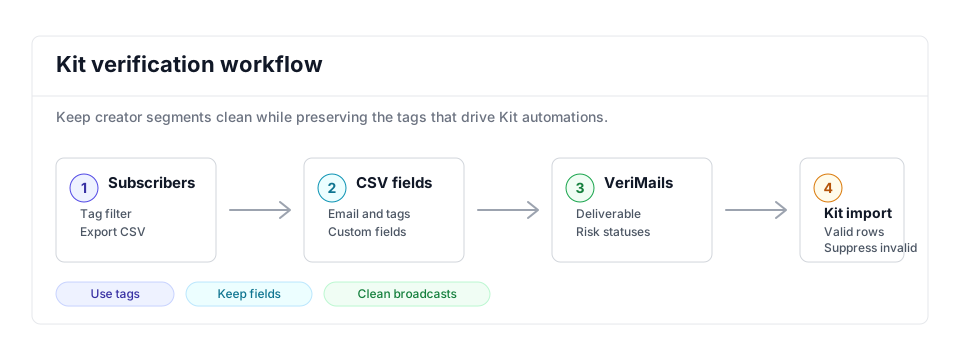
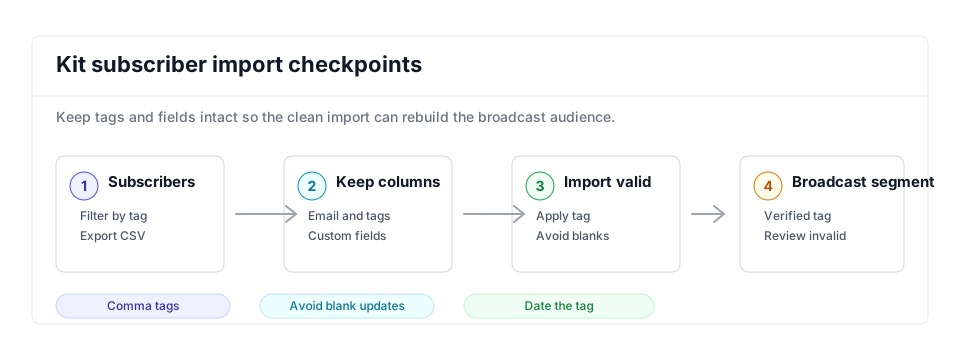
- Export scope: Use Kit filters to export the tag, segment, or subscriber group tied to the broadcast.
- Matching field: Keep Email, tags, and custom fields that determine automations or creator product segmentation.
- Result action: Import valid rows and unsubscribe or remove invalid contacts so dead addresses stop entering broadcasts.
Step-by-Step
Export your subscribers from Kit
In Kit, open Subscribers under the Grow tab. Use the filters if you want to verify a specific tag or segment, then select the subscribers using the checkbox at the top of the list. Kit emails a download link to your account email address. Export links expire after five days, so download the CSV promptly once it arrives.
Upload the CSV to VeriMails
Sign in to VeriMails and open the bulk verification tool. Drag in the CSV file you exported from Kit. VeriMails automatically detects the email column, so there is no need to clean up the file or remove other subscriber fields first. The job runs as a queued bulk verification and shows downloadable filtered results when it completes.
Review the verification results
Once the run finishes, VeriMails groups each address by status: valid, invalid, catch-all, disposable, and role-based. Review the breakdown to see the true health of your Kit list, then download the filtered results. The valid-only file lists the subscribers safe to keep sending to.
Re-import the cleaned list into Kit
In Kit, open the Subscribers page, click Add Subscribers, then Import CSV, and upload the valid-only file from VeriMails. Make sure the file has an email column. Kit updates existing subscriber records with the imported data rather than creating duplicates, so your cleaned subscribers stay intact.
Remove or quarantine the invalid addresses
Use the invalid file from VeriMails to find and unsubscribe or remove those addresses in Kit so they stop receiving broadcasts. Where those addresses are confirmed subscribers, cleanup may also reduce the count Kit bills against. Keep catch-all addresses in a separate tag rather than deleting them, since a portion will be deliverable. Verifying again before each major broadcast keeps your Kit list healthy long term.
Kit Cleanup Checklist
Use this table before a creator launch, newsletter broadcast, or sequence enrollment. It keeps the VeriMails result aligned with Kit tags, segments, and subscriber billing.
| Check | What to do | Why it matters |
|---|---|---|
| Segment choice | Export only the tag, segment, product audience, or broadcast recipient group you plan to use next. | Verification cost and cleanup effort stay tied to the contacts that can affect the next send. |
| Fields to keep | Preserve email, first name, tags, custom fields, status, and attribution data in the cleaned file. | Kit can update existing records, so keeping fields prevents a clean import from losing creator-business context. |
| Valid import | Import valid rows and add a dated verification tag such as verified-2026-05. | Creates a reliable send-ready audience for broadcasts and sequences. |
| Invalid cleanup | Unsubscribe or remove invalid and disposable rows; tag catch-all and role-based rows separately for review. | Keeps dead addresses out of automations and supports subscriber-count cleanup when those records are confirmed. |
| Repeat trigger | Verify before launches, affiliate promotions, webinar reminders, and any reactivation of an older tag. | Creator lists change quickly around launches, and old tags often contain stale subscribers. |
Frequently Asked Questions
Related Guides
Try VeriMails Free
100 free credits on signup. No credit card required. Put this guide into practice today.
Start Free