How to Verify Emails in AWeber
AWeber prices plans around subscriber tiers and send frequency, and it judges your account on deliverability across its sending infrastructure. A list carrying dead addresses can inflate campaign risk and steadily push your broadcasts toward the spam folder. Verifying your subscribers before you send keeps bounces low, protects your sender reputation, and gives you the files needed for responsible subscriber cleanup.
TLDR
- Export the subscribed AWeber audience that matches the next broadcast, not a wider account dump, so cleanup follows the real send plan.
- Run the CSV through bulk verification, keep valid subscribers for import, and route invalid or disposable rows out of broadcasts.
- Use verification before list merges and recurring campaigns to protect deliverability while you review subscriber tiers and cleanup policy.
Why Verify Your AWeber Contacts
AWeber is one of the longest-running email marketing platforms, widely used for newsletters and follow-up campaigns. It confirms an address can receive mail when a subscriber clicks a confirmed opt-in link, and it removes addresses after they hard bounce, but it does not continuously check whether older subscribers stay deliverable. Addresses age, inboxes are abandoned, and signup typos slip through. AWeber only registers the problem after a broadcast bounces, and by then the send has already counted against your reputation.
Bounces damage your sender reputation
Mailbox providers such as Gmail, Outlook, and Yahoo treat bounce rate as one of the clearest signals of list quality. When your AWeber broadcasts repeatedly hit addresses that do not exist, those providers route more of your mail to spam. AWeber operates deliverability monitoring on its shared sending infrastructure, so a high bounce rate can put your account under review and lead to sending restrictions. Verifying before you send keeps bounces in the low fractions of a percent, which is the range that keeps you in the inbox.
You are billed by subscriber count
AWeber pricing is tied to subscriber tiers and send frequency, with subscriber space increasing as an audience grows. An invalid, abandoned, or mistyped address can still sit in the subscribed audience until you clean it up. Verification identifies those records so you can unsubscribe or delete them under your retention policy, then confirm in AWeber whether subscriber space or plan settings should change.
Merging lists multiplies bad addresses
AWeber subscribers often combine multiple lists by exporting and re-importing them. Without verification, that workflow carries every dead address from each source list straight into the merged list, where the bad addresses bounce again on the next broadcast. Verifying the exported file before you merge stops you from importing known-undeliverable addresses and inflating your subscriber count with dead weight.
Spam traps put your domain at risk
Subscriber lists built over many years tend to accumulate recycled spam traps and role-based addresses such as info@ or admin@. Spam traps are addresses that blocklist operators monitor specifically to identify senders with weak hygiene, and a single hit can land your domain on a blocklist that affects every message you send. Verification surfaces traps and role addresses so you can remove or isolate them before they cause that damage.
What VeriMails Checks
VeriMails runs each address through several independent layers rather than a single pass-or-fail test. Each layer removes a different category of bad address, and together they produce a clear verification result operators can use for imports, removals, and review lists.
Syntax, MX, and DNS
The first checks confirm the address is correctly formatted, the domain resolves in DNS, and the domain publishes valid MX records pointing to a real mail server. An address that fails any of these can never receive an AWeber broadcast, so it is filtered out immediately.
Live SMTP handshake
VeriMails opens a real SMTP conversation with the receiving mail server to confirm that the specific mailbox accepts mail. This goes beyond confirming the domain works and confirms the individual address is deliverable. It is the check that best predicts whether your AWeber send will reach the inbox or bounce.
Catch-all, disposable, and role-based detection
Some domains are configured as catch-all and accept mail for any address whether or not the mailbox exists. VeriMails applies catch-all detection and labels these results separately so you can treat them with care. It also flags disposable addresses from temporary-inbox services and role-based addresses tied to a function rather than a person. With each category labeled, you keep the subscribers worth mailing and set the rest aside.
Pricing for AWeber Users
VeriMails keeps verification affordable next to the value of a clean AWeber list. Credit packs start at $0.0019 per email, and a 10,000-credit pack costs $19. Credit packs scale up to 5 million credits for $1,499, which suits large lists and agencies handling several AWeber accounts.
For teams that verify on a regular cadence, annual plans start at $12.50/month when billed yearly and bring the per-email cost down further. For AWeber users, verification is easiest to justify as routine hygiene: fewer stale subscribers in sends, clearer list exports, and better evidence for subscriber-space cleanup.
You can try VeriMails without paying. Signup includes 100 free credits, no credit card is required, and credits never expire, so you can verify a sample list exported from AWeber and review the results before committing.
Workflow Visual
Use this flow to clean AWeber subscribers before a broadcast or automated sequence pulls from the list.
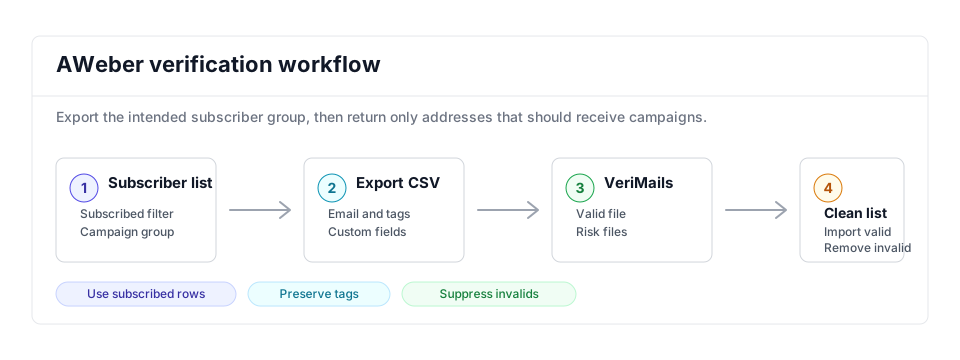
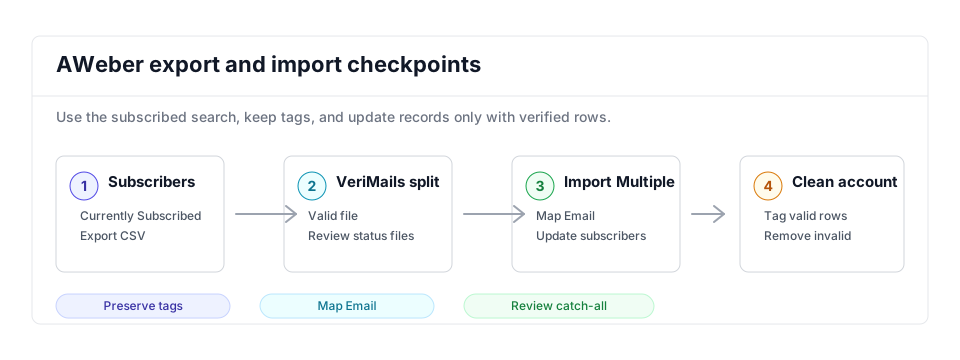
- Export scope: Use the list and subscriber status that match the broadcast audience instead of exporting every contact by default.
- Matching field: Keep Email plus subscriber tags or custom fields needed to rebuild the segment after cleanup.
- Result action: Re-import valid subscribers, then unsubscribe or remove invalid and disposable addresses before the next send.
Step-by-Step
Export your subscribers from AWeber
In AWeber, open the Subscribers page and select the list you want to clean. Apply the Currently Subscribed filter so unsubscribes are left out of the file, then click the Export CSV button at the bottom of the subscribers table to download a CSV with their information.
Upload the CSV to VeriMails
Sign in to VeriMails and open the bulk verification tool. Drag in the CSV file you exported from AWeber. VeriMails automatically detects the email column, so there is no need to reformat the file or strip out the other subscriber fields. The job runs as a queued bulk verification and shows downloadable filtered results when it completes.
Review the verification results
When the run completes, VeriMails groups each address by status: valid, invalid, catch-all, disposable, and role-based. Review the breakdown to understand the health of your AWeber list, then download the filtered results. The valid-only file is your list of subscribers that are safe to keep mailing.
Re-import the cleaned list into AWeber
Back in AWeber, go to the Subscribers tab and click Add Subscribers, then Import Multiple. Upload the valid-only CSV from VeriMails. On the Map Subscriber Info step, choose whether to add only new subscribers, update existing ones, or both, and confirm the email column is mapped correctly.
Remove or quarantine the invalid addresses
Use the invalid file from VeriMails to find those addresses in AWeber and unsubscribe or delete them so they stop receiving broadcasts. Then check subscriber space and billing status in AWeber before assuming a plan change. Keep catch-all addresses on a separate list rather than deleting them, since a share of them will be deliverable. Verifying again before each major broadcast keeps your AWeber list clean over time.
AWeber Cleanup Checklist
Use this operator table when the cleanup supports a broadcast, list merge, or follow-up sequence. It keeps the bulk verification result tied to the exact action you take in AWeber.
| Check | What to do | Why it matters |
|---|---|---|
| Export scope | Export the list and subscriber status that match the next broadcast, usually currently subscribed contacts only. | Prevents unsubscribed, inactive, or unrelated list members from returning to a clean send group. |
| Fields to preserve | Keep email, name, tags, custom fields, signup source, and any segmentation fields used by campaigns. | Lets the cleaned import rebuild AWeber targeting without losing personalization or source context. |
| Valid import | Import the VeriMails valid file into a dated verified list or update existing subscribers with a dated tag. | Makes the clean audience easy to select for the next newsletter or automation. |
| Risk handling | Unsubscribe or remove invalid and disposable rows; keep catch-all and role-based rows in a review list when they are worth keeping. | Keeps bounces out of broadcasts while preserving addresses that need a human decision. |
| Repeat trigger | Run the workflow before major sends, list merges, reactivation campaigns, and quarterly list hygiene. | Stops stale addresses from building back up between campaign cycles. |
Frequently Asked Questions
Related Guides
Try VeriMails Free
100 free credits on signup. No credit card required. Put this guide into practice today.
Start Free