How to Verify Emails in GetResponse
GetResponse prices plans around list size and monitors deliverability across its sending infrastructure. A list carrying dead addresses can waste campaign effort and steadily push your campaigns toward the spam folder. Verifying your contacts before you send keeps bounces low, protects your sender reputation, and gives you the files needed for accurate list cleanup.
TLDR
- Verify GetResponse exports before campaigns, funnels, or autoresponders so stale contacts do not keep bouncing through repeat sequences.
- Use bulk verification to split valid contacts from invalid, disposable, role-based, and catch-all rows, then import the valid CSV into a focused verified list.
- Check VeriMails pricing against your list size before large cleanups; one credit covers one address and credits never expire.
Why Verify Your GetResponse Contacts
GetResponse is a full email marketing and automation platform used for newsletters, autoresponders, and conversion funnels. It checks address syntax when contacts are imported and it removes contacts after they hard bounce, but it does not confirm in advance whether each address is still deliverable. Addresses age, inboxes get abandoned, and signup typos slip through. GetResponse only registers the problem after a campaign bounces, and by then the send has already counted against your reputation.
Bounces damage your sender reputation
Mailbox providers such as Gmail, Outlook, and Yahoo treat bounce rate as one of the clearest indicators of list quality. When your GetResponse campaigns repeatedly hit addresses that do not exist, those providers route more of your mail to spam. GetResponse also operates deliverability monitoring on its shared sending infrastructure, so a high bounce rate can lead to throttling or compliance review on your account. Verifying before you send keeps bounces in the low fractions of a percent, which is the range that keeps you in the inbox.
You are billed by list size
GetResponse billing is tied to purchased list size, peak active subscribers during the billing month, and contacts added during that month. An invalid, abandoned, or mistyped address can still be part of that operational count until you remove it. Verification identifies those addresses so you can clean the list before campaigns, autoresponders, or imports; confirm the active subscriber and list-size view before assuming a billing change.
Autoresponders amplify bad addresses over time
GetResponse is built around autoresponders and automation cycles, which means a single dead address does not just bounce once. It bounces on every message in the sequence, day after day, quietly accumulating failures against your sending domain. Verifying the list before you enroll contacts in an autoresponder stops that repeated damage and keeps your automation reporting accurate.
Risky contacts need separate handling
Contact lists collected over several years tend to gather role-based addresses such as info@ or office@, temporary inboxes, and stale contacts. VeriMails labels invalid, disposable, role-based, and catch-all results separately so you can remove or isolate them before they affect campaign quality.
What VeriMails Checks
VeriMails runs each address through several independent layers rather than a single pass-or-fail test. Each layer removes a different category of bad address, and the result is a practical status you can use for imports, removals, and review lists.
Syntax, MX, and DNS
The first checks confirm the address is correctly formatted, the domain resolves in DNS, and the domain publishes valid MX records pointing to a real mail server. An address that fails any of these can never receive a GetResponse campaign, so it is filtered out immediately.
Live SMTP handshake
VeriMails opens a real SMTP conversation with the receiving mail server to confirm that the specific mailbox accepts mail. This goes beyond confirming the domain works and confirms the individual address is deliverable. It is the check that best predicts whether your GetResponse send will reach the inbox or bounce.
Catch-all, disposable, and role-based detection
Some domains are configured as catch-all and accept mail for any address whether or not the mailbox exists. VeriMails applies catch-all detection and labels these results separately so you can treat them with care. It also flags disposable addresses from temporary-inbox services and role-based addresses tied to a function rather than a person. With each category labeled, you keep the contacts worth mailing and set the rest aside.
Pricing for GetResponse Users
VeriMails keeps verification affordable next to the value of a clean GetResponse list. Credit packs start at $0.0019 per email, and a 10,000-credit pack costs $19. Credit packs scale up to 5 million credits for $1,499, which suits large lists and agencies handling several GetResponse accounts.
For teams that verify on a regular cadence, annual plans start at $12.50/month when billed yearly and bring the per-email cost down further. For GetResponse users, routine verification is strongest as list hygiene: fewer sends to stale contacts, cleaner autoresponders, and better control over future list-size planning.
You can try VeriMails without paying. Signup includes 100 free credits, no credit card is required, and credits never expire, so you can verify a sample list exported from GetResponse and review the results before committing.
Workflow Visual
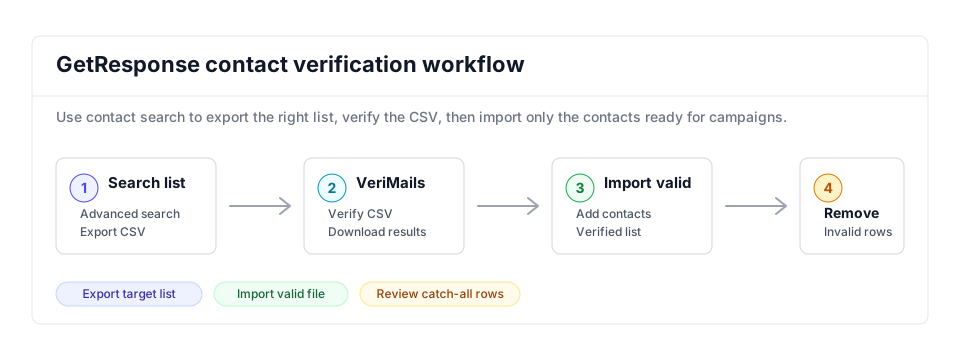
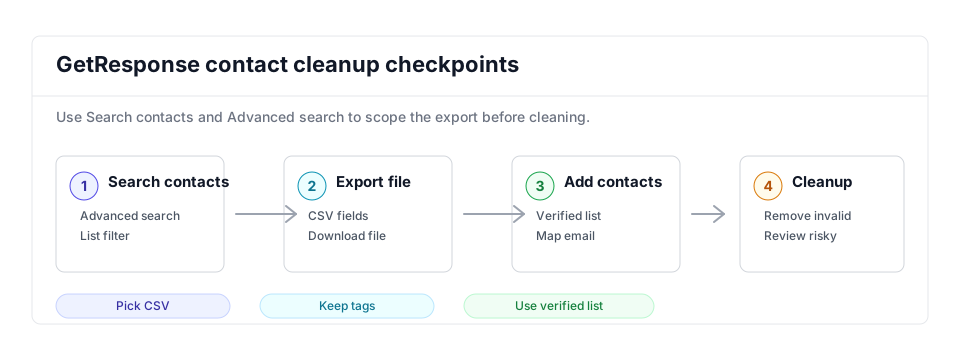
The GetResponse workflow should start from a focused contact search, then use VeriMails results to decide which contacts can be imported into the verified campaign list.
- Campaign prep: Add this cleanup to every email marketing workflow before large sends.
- Bulk verification: Use bulk CSV verification to separate valid, invalid, catch-all, disposable, and role-based contacts.
- Related platforms: Compare the same cleanup pattern in ActiveCampaign and MailerLite.
Step-by-Step
Export your list from GetResponse
In GetResponse, go to Contacts and click Search in the top menu. Use Advanced search to select the list or lists you want to clean and click Apply. Click the Actions icon, the vertical ellipsis next to the total contact count, then click Export. Name the file, choose CSV format, select the email field, and click Export new file. When it is ready, click Download. Exports stay available on the server for seven days.
Upload the CSV to VeriMails
Sign in to VeriMails and open the bulk verification tool. Drag in the CSV file you exported from GetResponse. VeriMails automatically detects the email column, so there is no need to reformat the file or strip out custom fields and tags. The job runs as a queued bulk verification and shows downloadable filtered results when it completes.
Review the verification results
When the run completes, VeriMails groups each address by status: valid, invalid, catch-all, disposable, and role-based. Review the breakdown to understand the health of your GetResponse list, then download the filtered results. The valid-only file is your list of contacts that are safe to keep mailing.
Re-import the cleaned list into GetResponse
Back in GetResponse, go to Contacts and click Add contacts, then choose to add contacts from a file. Upload the valid-only CSV from VeriMails, assign the contacts to a new list such as Verified, and map the email column to the correct field. GetResponse accepts CSV files up to 50 MB.
Remove or quarantine the invalid addresses
Use the invalid file from VeriMails to find those addresses in GetResponse and remove them so they stop receiving campaigns. Then check active subscriber and list-size metrics before assuming the cleanup affects billing. Keep catch-all addresses in a separate list rather than deleting them, since a share of them will be deliverable. Verifying again before each major campaign keeps your GetResponse list clean over time.
GetResponse Cleanup Checklist
Use this table when a GetResponse list is feeding a newsletter, autoresponder, funnel, or reactivation campaign. It turns the verification output into list actions.
| Check | What to do | Why it matters |
|---|---|---|
| Search criteria | Use Advanced search to export the list, tag, engagement group, or consent group you plan to email. | Keeps cleanup aligned with the exact audience entering campaigns or autoresponders. |
| Export columns | Keep email, list, tags, custom fields, subscription details, scoring, and consent fields where relevant. | Lets the clean file map back to GetResponse without losing segmentation or permission context. |
| Verified list | Import valid rows into a new verified list or update the campaign list after mapping the email column. | Creates a visible send-ready audience for campaigns and automations. |
| Autoresponder safety | Remove invalid and disposable rows before contacts enter multi-message sequences. | Prevents one bad address from bouncing repeatedly across an autoresponder cycle. |
| Review statuses | Hold catch-all and role-based rows in a separate list for lower-volume testing or manual review. | Keeps uncertain contacts away from the main campaign while preserving potentially valuable records. |
Frequently Asked Questions
Related Guides
Try VeriMails Free
100 free credits on signup. No credit card required. Put this guide into practice today.
Start Free