How to Verify Emails in Brevo
Brevo gives every sender a measured monthly email allowance and watches deliverability closely on its shared sending infrastructure. Mailing dead addresses burns through that allowance and pushes your campaigns toward the spam folder. Verifying your contacts before you send keeps bounces low, protects your sender reputation, and makes every email in your plan count.
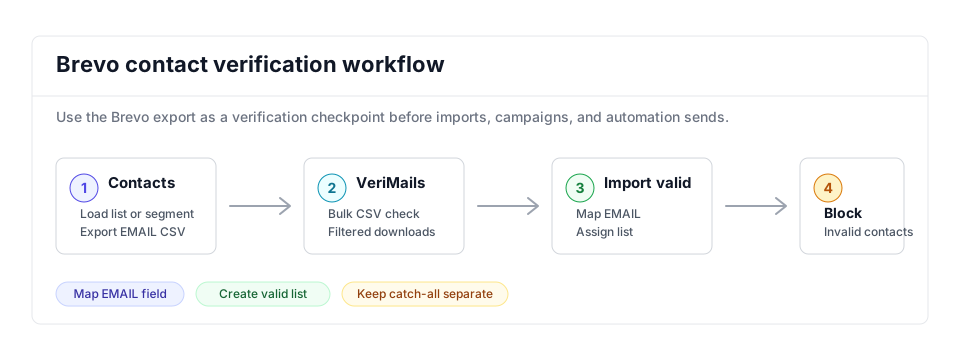
Export the Brevo list or segment, verify the EMAIL column with bulk verification, then import valid contacts to a clean list for the next campaign. Blocklist or quarantine invalid and disposable rows, hold catch-all and role-based rows for review, and use the verification API on custom forms if bad addresses keep entering Brevo.
Why Verify Your Brevo Contacts
Brevo, the platform formerly known as Sendinblue, handles transactional and marketing email for a wide range of businesses. It validates address syntax when a contact is created and it suppresses contacts after they hard bounce, but it does not check ahead of a send whether each address is genuinely deliverable. Addresses age, inboxes are abandoned, and signup typos slip through. Brevo only registers the problem once a campaign bounces, and that bounce is already counted against you.
Bounces damage your sender reputation
Mailbox providers such as Gmail, Outlook, and Yahoo read a sender's bounce rate as one of the clearest signs of list quality. When your Brevo campaigns repeatedly hit addresses that do not exist, those providers route more of your mail to spam. Brevo runs deliverability monitoring across the shared IP pools that most accounts use, so a poor bounce rate does not only hurt you, it can trigger account review and sending restrictions. Verifying before you send keeps your bounce rate in the low fractions of a percent, which is the range that protects inbox placement.
Stale sends drain your monthly allowance
Brevo plans are tied to selected monthly email volume, and current plan tiers also set contact storage limits. Every message sent to an invalid address uses part of that allowance without reaching a recipient. Verification helps keep campaign volume focused on addresses that are more likely to receive mail; any plan change depends on your actual usage, selected tier, and cleanup choices inside Brevo.
Engagement and automation logic get skewed
Invalid addresses never open and never click, so they pull down the open and click rates Brevo reports for each campaign. They also distort any automation that branches on engagement, since a contact that physically cannot receive mail will sit in a no-engagement path forever. A verified list means your Brevo reporting and your automation conditions reflect real recipient behavior.
Risky contacts need separate handling
Contact lists assembled over time tend to collect role-based addresses such as contact@ or support@, temporary inboxes, and addresses that no longer belong in regular campaigns. VeriMails labels invalid, disposable, role-based, and catch-all results separately so you can remove, blocklist, or isolate them before they affect campaign quality.
What VeriMails Checks
VeriMails runs each address through several independent layers rather than a single pass-or-fail test. Each layer removes a different type of bad address, and the result is a practical status you can use for imports, suppression, and review lists.
Syntax, MX, and DNS
The first checks confirm the address is correctly formatted, the domain resolves in DNS, and the domain publishes valid MX records pointing to a working mail server. An address that fails any of these can never receive a Brevo campaign, so it is filtered out at once.
Live SMTP handshake
VeriMails opens a real SMTP conversation with the receiving mail server to confirm that the specific mailbox accepts mail. This moves past confirming the domain works and confirms the individual address is deliverable. It is the check that best predicts whether a Brevo send will reach the inbox or bounce.
Catch-all, disposable, and role-based detection
Some domains are configured as catch-all and accept mail for any address whether the mailbox exists or not. VeriMails applies catch-all detection and labels these results separately so you can treat them with care. It also flags disposable addresses from temporary-inbox providers and role-based addresses tied to a function rather than a person. With each category labeled, you keep the contacts worth mailing and set the rest aside.
Pricing for Brevo Users
VeriMails keeps verification affordable next to the value of a clean Brevo list. Credit packs start at $0.0019 per email, and a 10,000-credit pack costs $19. Credit packs scale up to 5 million credits for $1,499, which works well for high-volume senders and agencies handling multiple Brevo accounts.
For teams that verify on a regular schedule, annual plans start at $12.50/month when billed yearly and bring the per-email cost down further. For Brevo users, the clearest value is fewer sends to stale contacts, cleaner campaign segments, and better evidence for choosing the right email-volume tier.
You can try VeriMails without paying. Signup includes 100 free credits, no credit card is required, and credits never expire, so you can verify a sample list exported from Brevo and review the results before committing.
Workflow Visual
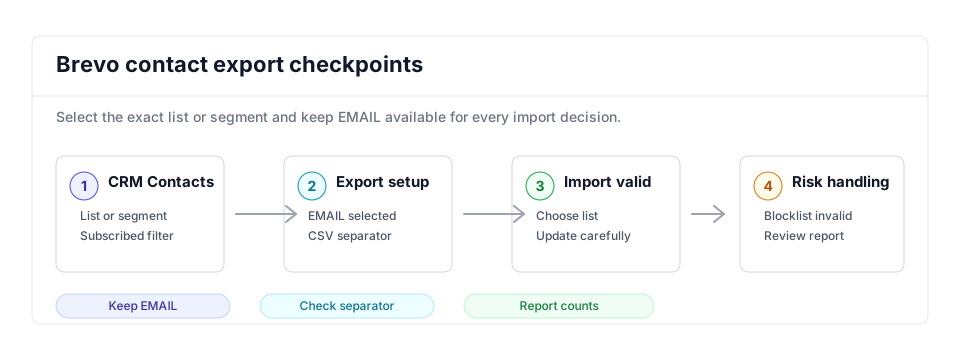
The Brevo workflow should keep valid contacts in a new campaign-ready list while invalid contacts are blocklisted, removed, or held out of regular sends.
- Marketing operations: Pair this cleanup with the email marketing verification workflow before major campaigns.
- CSV verification: Use bulk verification to split valid, invalid, catch-all, disposable, and role-based results.
- Related platforms: Compare the same list-cleaning flow in ActiveCampaign and MailerLite.
Step-by-Step
Export the right contacts
In Brevo, go to CRM then Contacts. To export one list or segment, click Load a list or segment and select it; to export everything, leave no list loaded and no filters applied. Select all contacts in that view, then choose More actions and Export. In Attributes, include EMAIL plus any fields you need for re-import, such as name, language, source, or list context.
Choose the CSV separator and check EMAIL
Brevo lets you export with semicolon or comma separators. Choose the separator your spreadsheet and VeriMails workflow will read cleanly, then confirm the EMAIL column is present before upload. Save the raw Brevo export untouched so you can compare it against the valid, invalid, and review files later.
Upload and verify in VeriMails
Sign in to VeriMails, open bulk verification, and upload the Brevo CSV. VeriMails detects the email column and returns statuses for valid, invalid, catch-all, disposable, and role-based contacts. Download the valid-only file for the campaign list and separate files for contacts that should be blocklisted or reviewed.
Import valid contacts to a clean list
Back in Brevo, go to CRM then Contacts and click Import contacts. Upload the valid-only CSV, map EMAIL to the email attribute, and assign the contacts to a new list such as Verified 2026-05. Use the update-existing-contacts option only when you intend to overwrite existing attributes, and leave empty-field imports off unless clearing data is deliberate.
Blocklist or quarantine bad rows
For invalid addresses, import a separate file and enable Blocklist the imported Email contacts during the final import step. Keep catch-all, disposable, and role-based contacts in review lists unless you have a specific reason to mail them. Large imports can take a few minutes, so check the import report before treating the list as campaign-ready.
Confirm campaign readiness
Build the next Brevo campaign from the verified list and exclude review lists. A clean output has the valid list mapped, invalid contacts blocklisted from email campaigns, and risky rows held out of the main send audience.
Operator Checklist
Run through these checks before a verified Brevo list is used in a campaign or automation.
| Check | What Good Looks Like | Why It Matters |
|---|---|---|
| Export view | The export comes from the exact list, segment, or full contacts view you intend to clean. | Prevents accidental account-wide verification when only one campaign list is needed. |
| Required field | EMAIL is present and maps cleanly; optional fields are kept only when they should be updated in Brevo. | Protects import mapping and existing contact data. |
| Valid import | The valid file imports into a dedicated verified list with clear naming and no accidental empty-field overwrites. | Makes the next campaign segment easy to audit. |
| Blocklist file | Invalid contacts are imported separately with email blocklisting enabled for the whole file. | Stops invalid contacts from receiving future email campaigns. |
| Campaign segment | The campaign audience includes the verified list and excludes catch-all, disposable, role-based, and invalid review lists. | Keeps deliverability decisions visible to the operator. |
Frequently Asked Questions
Related Guides
Try VeriMails Free
100 free credits on signup. No credit card required. Put this guide into practice today.
Start Free