Email Verification That Keeps Dental Chairs Full

Recall reminders and appointment notices only work if they reach the patient. VeriMails verifies your patient list so fewer reminders bounce and fewer chairs sit empty.

Quick take

The short version: verify first, then send.

Recall lists only work when patient addresses are current. Verify exports before hygiene reminders, appointment notices, and reactivation campaigns so fewer messages bounce and more chairs stay filled.

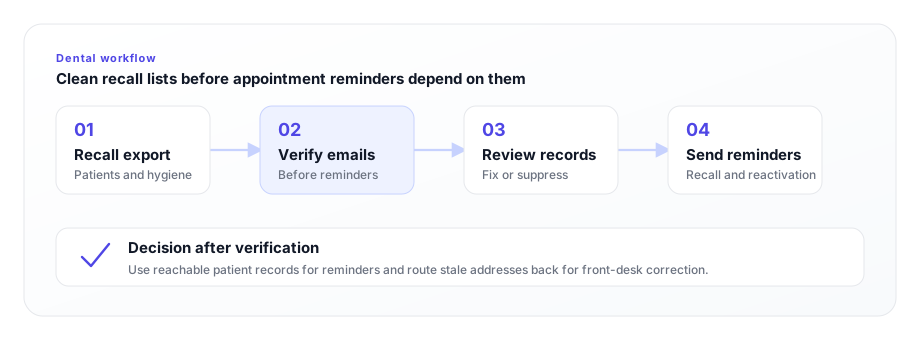
Dental practice workflow from recall export to verified appointment reminders
Clean recall exports before reminder platforms send appointment notices, reactivation emails, and hygiene follow-ups.

A dental practice runs on a calendar that never stops moving. Six-month recalls, hygiene visits, treatment-plan follow-ups, post-op check-ins, and birthday or reactivation campaigns all depend on one thing working quietly in the background: the patient actually receiving the message. When a patient email address is wrong, the reminder does not bounce loudly in front of your front-desk team. It fails silently. The patient never gets prompted, the appointment slips, and a hygiene chair that should have been booked stays open.

Patient email data decays faster than most practices realize. People switch internet providers, leave employers whose addresses they used at intake, abandon old inboxes, and mistype an address on a clipboard form while a child is pulling at their sleeve. Front-desk staff transcribe handwritten forms under time pressure. Over a few years, a meaningful slice of any patient database becomes undeliverable. Recall is the lifeblood of a healthy schedule, and a recall list full of dead addresses quietly drains production every single month.

Using bulk verification, VeriMails checks every patient email address before your reminder system ever sends to it. You verify the list, you remove the addresses that will never deliver, and your recall and appointment reminders start landing where they belong: in real inboxes, in front of real patients who can click to confirm.
The email problems holding back your recall system

Common deliverability issues in dental practices, and how verification solves them.

Recall reminders that never arrive

Reminders sent four to six weeks before a hygiene visit only reduce no-shows if they reach the patient. An invalid address means the reminder bounces and the patient is never prompted to book.

Stale addresses from old intake forms

Years of handwritten intake forms and front-desk transcription leave typos and outdated work addresses in your database. Verification flags them before they cost you an appointment.

A practice domain reputation at risk

Every hard bounce signals to inbox providers that your domain sends to dead addresses. Enough of them and even valid reminders start landing in spam, hurting every patient you email.

Reactivation campaigns wasted on bad data

Win-back campaigns to lapsed patients are only as good as the addresses you send them to. Verify first so your reactivation budget reaches patients who can actually return.

Disposable and role addresses in your list

Temporary inboxes and shared role addresses like info@ or office@ behave unpredictably. VeriMails detects both so your patient communications go to real, personal inboxes.

No visibility into list health

Most practices have no idea how many addresses in their database are dead. A bulk verification gives you a clear breakdown of valid, invalid, catch-all, and risky addresses.

Why patient email accuracy matters more than ever

Inbox providers like Gmail and Outlook have tightened their standards. They now watch sender behavior closely, and a practice domain that repeatedly emails invalid addresses sees its sender reputation quietly penalized. The penalty is not a warning email. It is reduced inbox placement, which means your perfectly valid recall reminders start landing in spam folders where patients never see them. A clean list protects the deliverability of every message you send, not just the ones to dead addresses.

There is also a privacy dimension worth being clear about. Dental practices handle protected health information, and patient communications are governed by HIPAA. VeriMails is not a HIPAA compliance product and does not send patient communications. What it does is confirm whether an address is real and able to receive mail. Sending a reminder that bounces back through an unsecured channel, or sending patient information to an address that now belongs to a stranger, is a risk worth removing. Verifying addresses before you send is a simple, sensible piece of basic hygiene that sits alongside whatever HIPAA-aware messaging platform your practice already uses.

The financial logic is straightforward. A single missed hygiene appointment is worth far more than the cost of verifying an entire patient database. When verification starts at $0.0019 per email, cleaning your recall list costs less than one no-show, and it pays for itself the first time a reminder reaches a patient who would otherwise have slipped through the cracks.

How it works

From practice management export to a clean recall list in minutes.

01

Export your patient list

Pull a CSV of patient contacts from Dentrix, Eaglesoft, Open Dental, Curve, or whatever practice management software you use. Any file with an email column is ready to go.

02

Upload and verify

Drop the file into VeriMails. We auto-detect the email column and run syntax, MX, DNS, and a live SMTP check on every address, plus catch-all and disposable detection.

03

Send reminders with confidence

Download the verified file and import only the deliverable addresses back into your recall and reminder system. Watch bounces drop and confirmations rise.

SMTP
Live mailbox checks
API
Real-time checks
CSV
Bulk verification
100
Free starting credits

Dental recall list verification checklist

Clean patient contact data before hygiene reminders, appointment notices, and reactivation campaigns.

Prepare the list before the reminder run

  • Export from practice management software. Start with the system that holds current appointment and recall status.
  • Verify inactive and overdue patients first. Older records are more likely to contain stale addresses from old intake forms.
  • Suppress invalid records before import. Keep bounced addresses out of reminder platforms so staff are not chasing failures.
  • Review family and shared inboxes. Confirm the address still fits the patient communication workflow before sending reminders.
  • Repeat before major reactivation pushes. A clean list protects deliverability when you email many dormant patients at once.

Where verification fits

MomentVerifyUse next
Recall runHygiene and overdue patient exportsBulk verification
New patient intakeForm submissions and portal signupsVerification API
Practice marketingNewsletter and whitening promo listsEmail list cleaning

A verified recall list gives the front desk cleaner data before reminders, confirmations, and follow-up calls begin.

We ran our whole recall list through VeriMails and found a surprising number of dead addresses left over from old intake forms. Cleaning them out lifted our reminder open rates noticeably, and the front desk spends far less time chasing patients who never got the email.
Dr. Megan R. — Practice Owner, General Dentistry, United States

Frequently asked questions

Yes. Export your patient contacts from Dentrix, Eaglesoft, Open Dental, Curve, or any practice management system as a CSV and upload the file. VeriMails automatically detects the email column and verifies every address, so you do not need to reformat the export.
No. VeriMails verifies whether an email address is valid and able to receive mail. It is not a HIPAA compliance product and does not send patient communications. Use a HIPAA-aware messaging platform for any email that contains protected health information, and use VeriMails to confirm the addresses on that platform are real before you send.
Recall and appointment reminders only reduce no-shows if they reach the patient. When an address is invalid, the reminder bounces silently and the patient is never prompted to confirm. Verifying your recall list first means more reminders land in real inboxes, so fewer chairs sit empty.
Bulk verification is fast. A typical recall export of around 10,000 rows runs as a background job. You can verify a full year of patient contacts in a single session and download a clean file ready to import back into your reminder system.
Verification starts at $0.0019 per email, and a 10,000-credit pack is $19. Most single-location practices verify their entire patient database for the price of one no-show. You also get 100 free credits on signup with no credit card, and credits never expire.

Start verifying emails today

100 free credits. No credit card required.

Get started for free