VeriMails vs Apollo.io
Apollo.io helps sales teams find prospects, reveal business emails, enrich records, and run outreach. VeriMails helps teams clean email lists they already have. Use Apollo when you need contact data; use VeriMails when you need to reduce bad, risky, or uncertain emails before a campaign or CRM import.
At a Glance
| Question | VeriMails | Apollo.io |
|---|---|---|
| What do you need? | Clean an existing email list | Find prospects and contact details |
| Primary product | Email verification, bulk cleanup, API checks, and exports | Sales intelligence, contact data, enrichment, sequences, and CRM workflows |
| Best starting point | You already have emails from a CRM, lead vendor, event, form, or export | You need to build or enrich a prospect list first |
| Pricing model | Verification credits with no seat fee | Plans, fair-use credits, export credits, and API/enrichment usage |
| When your site needs checks | Check emails from forms, apps, and uploaded lists | Search and enrich people or company records |
| Uncertain emails | Catch-all and uncertain emails stay separate for review | Review Apollo email statuses before sending; some exports may still need a fresh cleanup pass |
What the Products Show
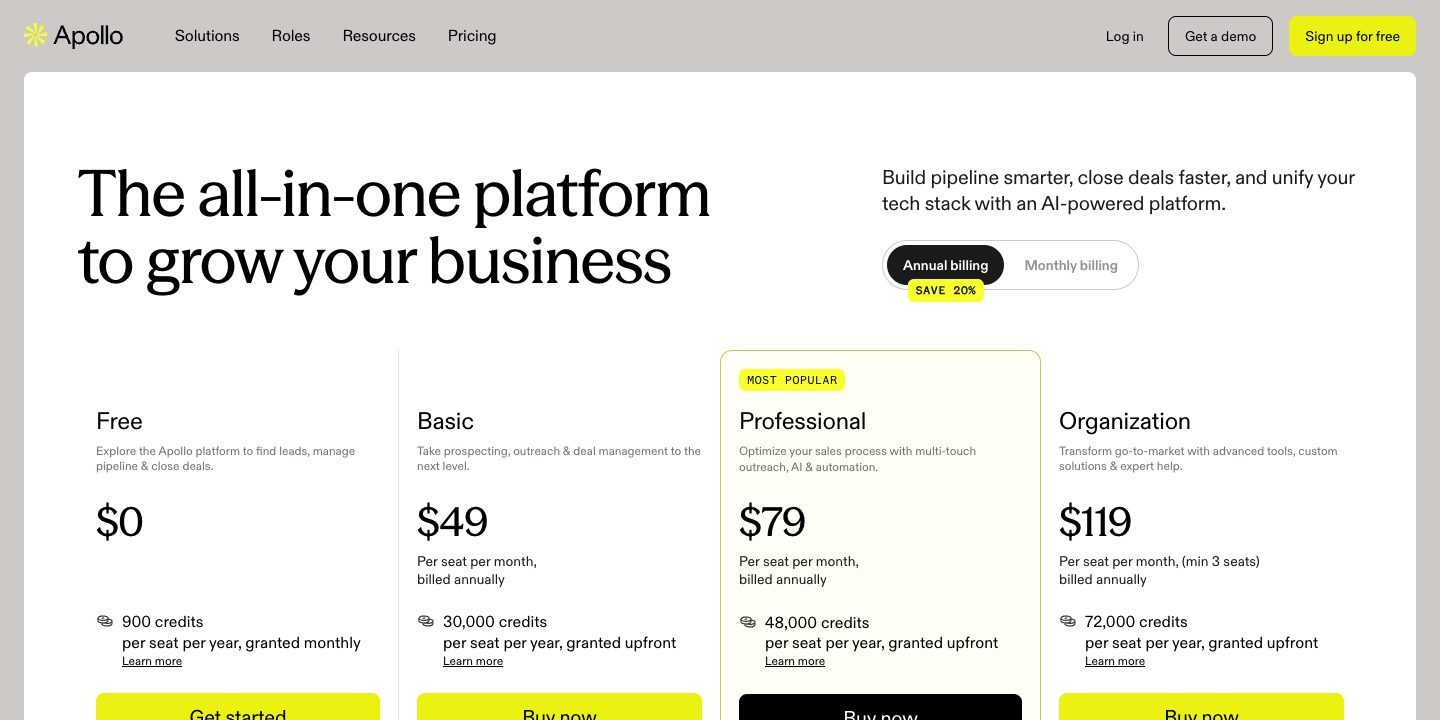
Apollo and VeriMails sit at different points in the outreach workflow. Apollo's public pricing and product pages are built around contact access, enrichment, and sales engagement. VeriMails is built around checking the final list before the next send.
Which Tool Fits Your Team?
The key difference is simple: Apollo helps you build the list, while VeriMails helps you clean the list. Apollo's email finder page positions the product around finding verified business emails for millions of professionals across millions of companies. Apollo's API documentation also focuses on searching and enriching people or company records.
VeriMails does not replace that prospecting layer. It does not sell contact data, run sales sequences, or enrich companies. It takes the list you already have and helps you decide which emails are safe enough to use, which should be removed, and which need more caution.
| Team situation | Better fit | Why |
|---|---|---|
| Find new B2B prospects | Apollo | Apollo is built around contact discovery, email finding, and enrichment. |
| Clean an Apollo export before sending | VeriMails | The list already exists; the job is now reducing bad or risky emails. |
| Add missing phone numbers or company data | Apollo | Verification alone will not enrich a record with new sales data. |
| Check emails from a product signup form | VeriMails | You already have the submitted email and need a fast check. |
| Run outbound sequences in one platform | Apollo | Apollo includes sales engagement workflows beyond verification. |
Pricing, Credits, and Cost Control
Apollo pricing is designed for a sales platform. Its public pricing page lists a Free plan, a Basic plan at $49 per month, a Professional plan at $99 per month, and Enterprise as contact-for-pricing. The same page explains that Unlimited plans have fair-use credit limits and that export credits are consumed when contacts leave Apollo through CSV, CRM sync, or Person API enrichment.
VeriMails pricing is designed for list cleaning. You buy verification credits, use them to check email addresses, and keep the credits until they are used. There are no sales seats to buy just to verify a list.
| Cost factor | VeriMails | Apollo.io | What this means |
|---|---|---|---|
| Buying unit | Email verification credits | Sales platform plans and credits | Do not compare them as if both sell the same thing. |
| Seat cost | No seat fee for verification credits | Paid plans are priced as software plans | Apollo cost depends on team size and platform usage. |
| Export usage | Exporting cleaned verification results is part of the list cleanup flow | Apollo says export credits are consumed when contacts are exported outside Apollo | Apollo exports can affect credit planning. |
| Best value when | You need to clean a known number of emails | You need contact discovery and enrichment | Start with the job, then compare cost. |
Apollo pricing and fair-use language can change. Confirm current plan terms on Apollo's pricing page before buying.
VeriMails Credit Pricing
| Credits | VeriMails Price | Price per Email |
|---|---|---|
| 10,000 | $19 | $0.0019 |
| 25,000 | $39 | $0.00156 |
| 50,000 | $59 | $0.00118 |
| 100,000 | $99 | $0.00099 |
| 250,000 | $199 | $0.000796 |
| 500,000 | $349 | $0.000698 |
| 1,000,000 | $499 | $0.000499 |
| 2,500,000 | $999 | $0.0004 |
| 5,000,000 | $1,499 | $0.0003 |
VeriMails credits never expire. Email Finder costs 20 credits only when VeriMails returns a verified person-level email. At the 10,000-credit pack, that is $0.038 per found email. Monthly plans start at $12.50/mo when billed yearly.
When You Need API Access
Apollo's API documentation is built for teams adding sales data to their workflow. Its People API Search endpoint helps find net-new people in Apollo's database, but Apollo says that endpoint does not return email addresses or phone numbers. For emails or phone numbers, Apollo points users to enrichment endpoints, where credits can apply.
VeriMails has a narrower job: check an email you already captured. That makes it simpler when your signup flow, CRM import, or list upload needs a direct email check before the address is saved or used.
| If you need to... | VeriMails | Apollo.io |
|---|---|---|
| Check a submitted email address | Good fit: verify the email directly | Not the main API use case |
| Find people in a prospect database | No contact database | Good fit: People API Search is built for prospecting |
| Reveal emails or phone numbers | No enrichment database | Use Apollo enrichment endpoints |
| Clean an uploaded list | Good fit: bulk verification and export | Use Apollo for enrichment first, then verify the final file elsewhere if needed |
| Keep verification spend predictable | Credits map directly to email checks | Credits depend on Apollo data and enrichment usage |
What to Do With Apollo Exports
Apollo can be the source of a strong prospect list, but a list still changes once it leaves the contact platform. People change jobs, companies change domains, shared addresses appear in CRMs, and catch-all domains can make a record less certain than it looks. That is why the cleaning step should happen after the list is assembled and before the campaign is uploaded.
Catch-all and Uncertain Emails
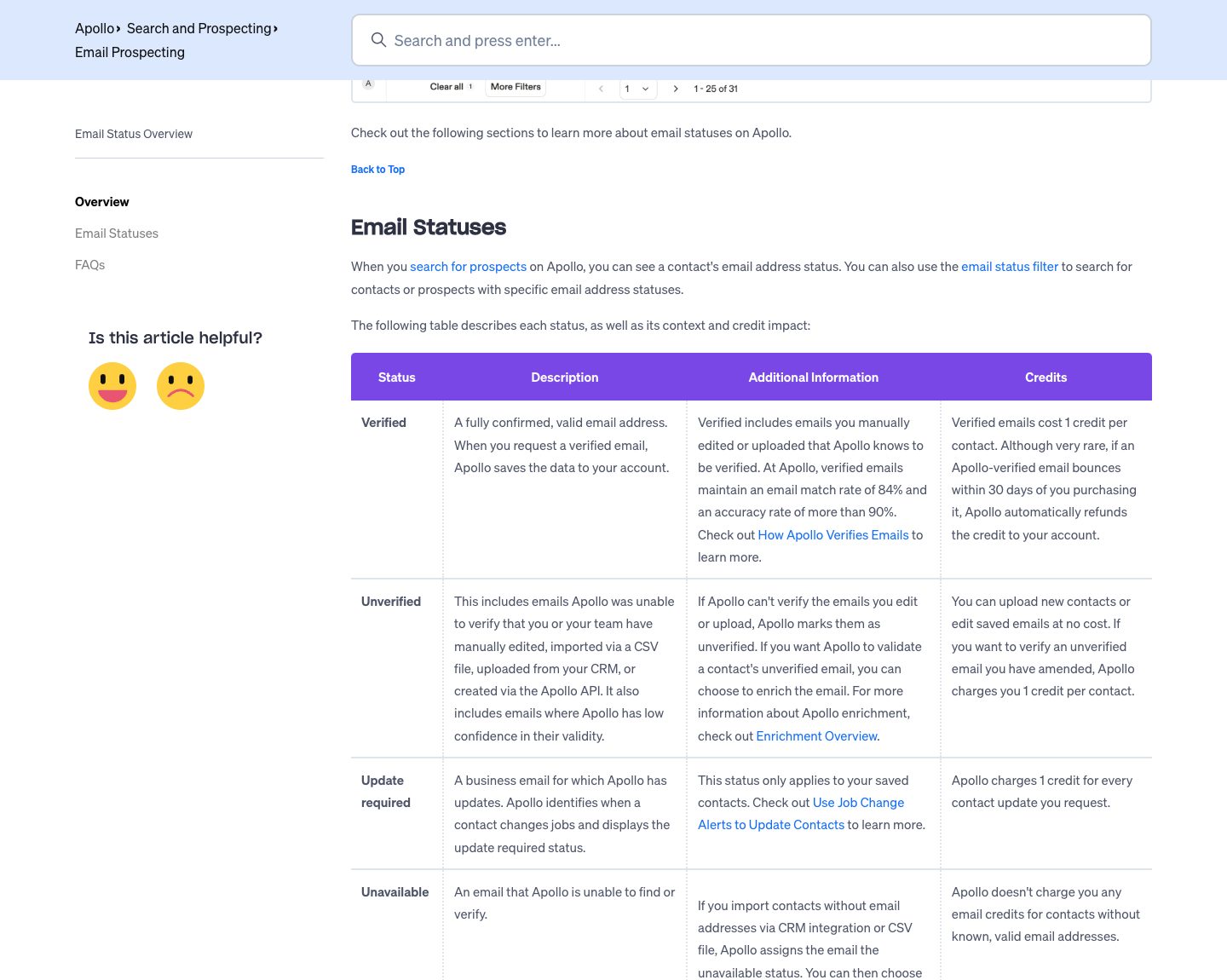
Apollo's product screenshot for email status shows labels such as catch-all, unverified, unavailable, and verified. For your team, the practical point is simple: catch-all and uncertain emails deserve review before they are treated like the safest addresses in a send list.
VeriMails keeps catch-all and uncertain emails separate in the verification result. That lets your team suppress them, send conservatively, route them to a lower-risk sequence, or review them manually. This is especially useful for B2B lists because company domains often have mail settings that make mailbox-level certainty harder.
| Email group | Recommended action | Why it matters |
|---|---|---|
| Clearly valid | Use after dedupe and consent checks | This is the safest group for normal outreach. |
| Invalid or unavailable | Remove before upload | These addresses create avoidable bounce risk. |
| Catch-all | Keep separate and decide based on risk tolerance | The domain may accept broadly, so mailbox-level confidence is lower. |
| Unverified or unknown | Review, refresh, or test conservatively | These records should not be mixed into the safest send group. |
Localized and International Lists
Apollo is useful for international prospecting because it can help sales teams find contacts across companies, roles, and markets. Once those lists exist, the next question is whether each regional send list is clean enough to use. Country-specific campaigns often include older company domains, regional free email providers, role-based contacts, and catch-all domains.
For localized campaigns, keep the workflow simple. Use Apollo to build or enrich the regional audience, then use VeriMails to clean the final list and keep questionable emails out of the main send. If you localize landing pages or outreach by country, treat the verification export the same way: valid records can enter the main sequence, while catch-all and uncertain records should be handled more carefully.
| Localized use case | Recommended approach | Tool fit |
|---|---|---|
| Find prospects in a new market | Use a contact database, then verify the final send list. | Apollo first, VeriMails after |
| Clean a regional CRM export | Verify the full list and keep uncertain addresses separate. | VeriMails |
| Prepare multilingual outreach | Segment by country or language, then verify before sending. | VeriMails for the hygiene step |
| Enrich local company records | Add missing contact details before verification. | Apollo |
Which Should You Choose?
Choose VeriMails if...
- You already have email addresses and need to clean them before sending.
- You want verification pricing that maps directly to the number of emails checked.
- You need catch-all, invalid, disposable, and uncertain emails separated from the safest export.
- You are cleaning Apollo exports, CRM lists, signup lists, event lists, or lead vendor files.
Choose Apollo if...
- You need to find new prospects and business emails.
- You want enrichment, sales engagement, sequences, CRM workflows, or a large contact database.
- Your team needs a sales intelligence platform, not just a verifier.
- You want API access for search and enrichment against Apollo's database.
Sources Used for This Comparison
This comparison uses public Apollo and VeriMails pages. Check current pricing, credit rules, and API details before buying because vendor pages can change.
Verification Accuracy
Accuracy depends on when the address is checked and what job the tool is built for. Apollo.io is strongest when you need new contact data or enrichment. VeriMails is strongest after you already have a list and need a fresh deliverability result before you send.
Run the list through syntax, domain, MX, SMTP, disposable, role-based, and catch-all detection checks close to the campaign date. That gives you current valid, invalid, catch-all, and risky buckets instead of trusting an older discovery label.
Who VeriMails Is Best For
Choose VeriMails when verification is the job and you want the result before the send.
- You already sourced contacts and now need to check which addresses are safe to send.
- You want prepaid verification credits that never expire.
- You need API and CSV verification without paying for a larger sales platform.
Who Apollo.io Is Best For
Choose Apollo.io when its broader product strengths match the job you are buying for.
- Choose Apollo.io when you need to find new contacts, phone numbers, company data, or enrichment.
- Choose it when your budget is for prospect discovery rather than cleaning a list you already own.
- Choose it when sales workflow, browser extension, CRM enrichment, or database coverage matters more than verification cost.
Frequently Asked Questions
Why teams switch to VeriMails
“Recruiting outreach is cold email with higher stakes. One bounced email to a passive candidate is a missed hire. Verification before every outreach batch is non-negotiable now.”
— Lisa R. — Sourcing Lead at Executive Search Firm, United States
“Evaluated five verification APIs. VeriMails had the simplest auth, the fastest response, and the cheapest price per call. Decision took ten minutes.”
— Oscar T. — Senior Developer at E-Commerce Platform, Sweden
Related Comparisons
Try VeriMails Free
100 free credits on signup. No credit card required. Clean an Apollo export or any other email list before sending.
Start Free