VeriMails vs ContactOut
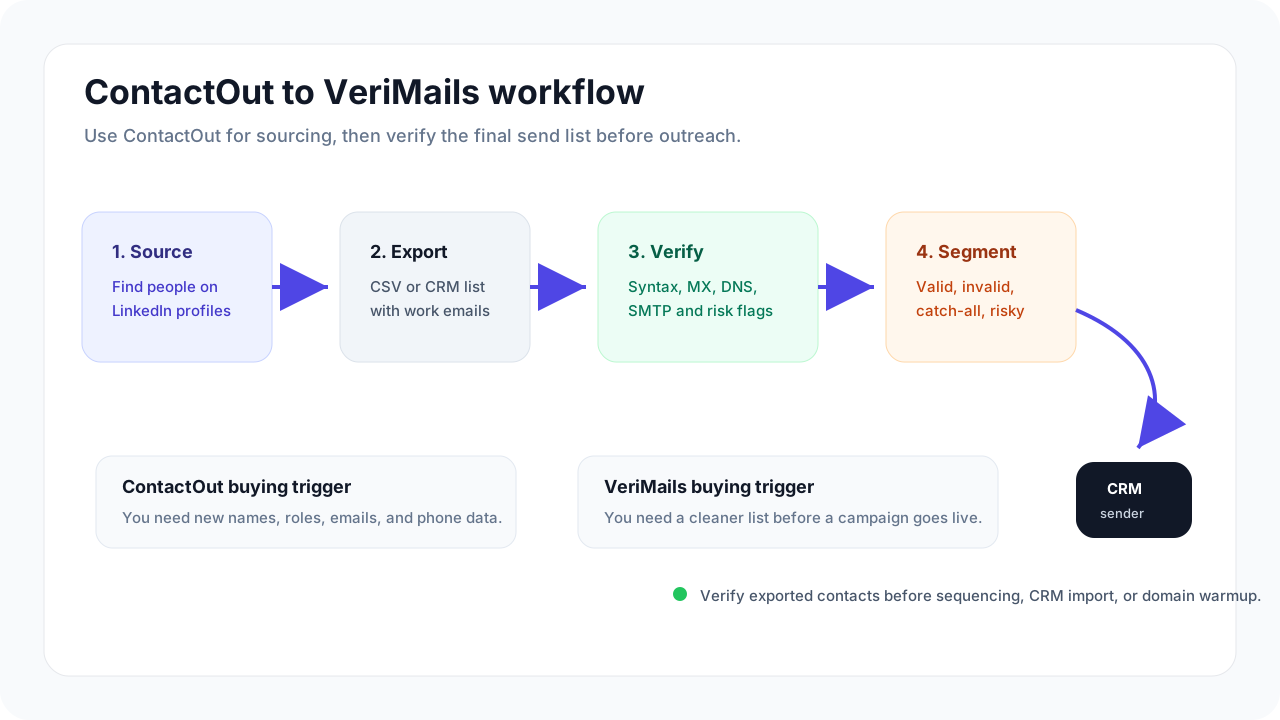
Use ContactOut when you need to find new prospects or candidates. Use VeriMails when you already have email addresses and want to clean the list before it goes into a campaign, CRM, or recruiting sequence.
At a Glance
| Category | VeriMails | ContactOut |
|---|---|---|
| Best for | Cleaning email lists before sending or importing | Finding emails and phone numbers for prospects or candidates |
| Starting point | You already have a list | You still need to build the list |
| Main value | Fewer bad emails in your campaign or CRM | More contact details for sales or recruiting outreach |
| Bulk list checks | Built around CSV upload, review, and export | Available through ContactOut's email verifier |
| Uncertain emails | Separated so you can send more conservatively | Included as one part of a broader contact data product |
| How to compare cost | Cost to clean a list | Value of found contacts, phone numbers, and team access |
How the Tools Work
Which Tool Fits Your Team?
A basic feature comparison might ask whether both tools offer email verification. They do. ContactOut publishes an email verifier and also supports bulk checks. That does not answer the question most teams care about.
The practical difference is where each tool fits in your day. ContactOut is mainly built for finding new contacts: sales prospects, recruiting candidates, company contacts, and direct dials. VeriMails is built for the moment after you have the email addresses and need to decide which ones belong in your next send.
That difference changes which tool is the better fit. If your team is still building the list, ContactOut may come first. If your team already has a list from a CRM, event, form, lead vendor, ecommerce export, newsletter, or recruiting project, VeriMails is the simpler tool for cleaning that list before outreach.
| Question to ask | Choose VeriMails when... | Choose ContactOut when... |
|---|---|---|
| Do we already have emails? | Yes, and the list needs cleaning. | No, we need to find people and contact details first. |
| What does success look like? | A cleaner list with safer emails separated from questionable ones. | More prospects or candidates with usable contact details. |
| Who will use it most? | Marketing, sales, recruiting, ecommerce, CRM, or agency teams cleaning data. | Sales reps, sourcers, recruiters, or growth teams building lists. |
| How should cost be judged? | By the cost to clean the list you plan to use. | By the value of contacts found, phone coverage, and team productivity. |
Email Verification Use Cases
ContactOut is not only for contact discovery. Its public email verifier says teams can check email lists in bulk, and its public documentation describes email verification for single addresses and batches. That matters if your team wants one platform for finding contacts and checking some of those emails.
VeriMails is more direct when list cleaning is the main job. The product experience is centered on uploading a list, seeing which emails are safer to use, keeping questionable emails separate, and exporting the cleaned file for your CRM or campaign tool.
| Use case | Better fit | Why |
|---|---|---|
| Clean a CRM export | VeriMails | You need a cleaner file, not more contacts. |
| Find candidate emails | ContactOut | Recruiters need contact discovery before list cleaning. |
| Check emails from a signup form | VeriMails | The email is already supplied, so the job is to check it. |
| Add phone numbers and profile data | ContactOut | Email verification alone will not add the extra contact context. |
| Prepare a campaign send list | VeriMails | You can keep bad and questionable emails out of the main upload. |
Pricing, Credits, and Limits
ContactOut should be evaluated like a contact data platform. Its pricing page points Team and API plans to contact sales, and its terms say paid unlimited plans operate under a fair-use policy of 2,000 email credits and 1,000 phone credits per account per month unless a separate agreement says otherwise. For teams that need new contacts and phone numbers, that may make sense.
VeriMails should be evaluated like an email list cleaning tool. You buy credits to check email addresses, and prepaid credits stay available until used. That makes planning simpler when your main question is how much it will cost to clean 10,000, 50,000, or 100,000 existing emails.
| Cost factor | VeriMails | ContactOut | What this means for you |
|---|---|---|---|
| How to compare pricing | Cost to check the list you already have | Value of contact discovery and team access | Start with the outcome you need. |
| Usage limits | Credits reflect the email volume you plan to clean | Published terms include fair-use limits for unlimited plans | Large cleanup projects are easier to budget in VeriMails. |
| Getting API access | Available for email verification use cases | Team/API pricing is listed as Contact Us | Teams that need ContactOut API access may need to contact sales first. |
| Best value when you need | A cleaner campaign list or CRM import | New prospects with email and phone data | These tools solve adjacent but different problems. |
ContactOut plan details and credit terms can change. Confirm live pricing, fair-use terms, and API access requirements before buying.
VeriMails Credit Pricing
| Credits | VeriMails Price | Price per Email |
|---|---|---|
| 10,000 | $19 | $0.0019 |
| 25,000 | $39 | $0.00156 |
| 50,000 | $59 | $0.00118 |
| 100,000 | $99 | $0.00099 |
| 250,000 | $199 | $0.000796 |
| 500,000 | $349 | $0.000698 |
| 1,000,000 | $499 | $0.000499 |
| 2,500,000 | $999 | $0.0004 |
| 5,000,000 | $1,499 | $0.0003 |
VeriMails credits never expire. Email Finder costs 20 credits only when VeriMails returns a verified person-level email. At the 10,000-credit pack, that is $0.038 per found email. Monthly plans start at $12.50/mo when billed yearly.
What to Do With Questionable Emails
The biggest mistake in list cleaning is treating every non-bounced email as safe. Some addresses are clearly usable. Some should be removed. Others sit in the middle because the mailbox or domain is harder to judge.
VeriMails is designed to keep those groups separate so your safest emails are not mixed with emails that deserve a more conservative decision. This matters most before cold outreach, candidate outreach, customer reactivation, newsletter sends, and CRM imports where bounce rate and sender reputation matter.
| Email type | Recommended action | Why it matters |
|---|---|---|
| Safest emails | Use after deduplication and consent checks. | This is the group most teams want in the main send. |
| Bad emails | Remove before campaign upload. | They create avoidable bounce risk. |
| Catch-all emails | Keep separate and decide based on risk tolerance. | The domain may accept mail broadly, so the exact mailbox is less certain. |
| Temporary emails | Usually remove for CRM, sales, and recruiting lists. | Temporary inboxes are weak long-term contacts. |
| Uncertain emails | Review separately or send more conservatively. | They are not strong enough for your safest group. |
Sales and Recruiting Lists
ContactOut is especially relevant for recruiters and sales teams because it helps find contact details in the first place. Its public pages describe a Chrome extension, LinkedIn prospecting, company data, email addresses, phone numbers, and a large database of professionals.
Once the list exists, the job changes. A recruiter export, sales sequence list, webinar list, or country-specific outreach list still needs cleanup before it is used. VeriMails fits that second step: checking the emails and helping you keep the questionable ones out of the main send.
| Use case | Recommended approach | Tool fit |
|---|---|---|
| Build a candidate list | Find prospects, then clean the final email list before outreach. | ContactOut first, VeriMails after |
| Clean a recruiter export | Separate safer emails from emails that need review. | VeriMails |
| Prepare sales outreach | Check existing emails before adding them to a sequence. | VeriMails |
| Add phone and profile data | Use a contact data product before list cleaning. | ContactOut |
Which Should You Choose?
Choose VeriMails if...
- You already have email addresses and need to clean them before sending.
- You want a focused CSV upload, review, and export experience.
- You need to keep safer emails separate from questionable ones.
- You are preparing campaign, CRM, recruiting, ecommerce, or agency list exports.
Choose ContactOut if...
- You need to find emails and phone numbers for prospects or candidates.
- Your research starts on LinkedIn or company websites.
- You need contact enrichment, search, campaigns, or recruiting tools.
- You are choosing a broader contact data platform for a team.
Sources Used for This Comparison
This comparison uses public ContactOut and VeriMails pages. Check current pricing, terms, and API access before buying because vendor pages can change.
Verification Accuracy
Accuracy depends on when the address is checked and what job the tool is built for. ContactOut is strongest when you need new contact data or enrichment. VeriMails is strongest after you already have a list and need a fresh deliverability result before you send.
Run the list through syntax, domain, MX, SMTP, disposable, role-based, and catch-all detection checks close to the campaign date. That gives you current valid, invalid, catch-all, and risky buckets instead of trusting an older discovery label.
Catch-all Detection
Catch-all domains accept mail for many or every mailbox at a domain, so an SMTP check cannot prove that one specific person exists. Treating those addresses as confirmed valid is how avoidable bounces and weak replies enter a campaign.
VeriMails flags catch-all domains as their own result so you can keep confirmed valid addresses separate. If ContactOut does not expose the catch-all result clearly in exports or API responses, ask for that field before using the data in a live send.
API and Developer Experience
If your product needs to check addresses at signup, checkout, import, or form submit, VeriMails gives you a direct verification API without buying a contact database. ContactOut is better when the API job includes finding or enriching people.
Use the single-check endpoint for real-time forms and the bulk endpoint when you already have a CSV or CRM export. Both paths return the same status model, so developers and campaign operators work from the same result.
Who VeriMails Is Best For
Choose VeriMails when verification is the job and you want the result before the send.
- You already sourced contacts and now need to check which addresses are safe to send.
- You want prepaid verification credits that never expire.
- You need API and CSV verification without paying for a larger sales platform.
Who ContactOut Is Best For
Choose ContactOut when its broader product strengths match the job you are buying for.
- Choose ContactOut when you need to find new contacts, phone numbers, company data, or enrichment.
- Choose it when your budget is for prospect discovery rather than cleaning a list you already own.
- Choose it when sales workflow, browser extension, CRM enrichment, or database coverage matters more than verification cost.
Frequently Asked Questions
Why teams switch to VeriMails
“We source candidates from LinkedIn and verify their emails before outreach. Hit rate went from 60% to 93%. Saves hours of wasted follow-up.”
— Sarah J. — Talent Acquisition Lead at Tech Recruiter, United Kingdom
“No SDK needed. We wrote a Python wrapper in 30 minutes. Rate limits are generous and the error handling is straightforward.”
— Raj P. — Full-Stack Developer at Data Enrichment Startup, United Kingdom
Related Comparisons
Try VeriMails Free
100 free credits on signup. No credit card required. Start cleaning your email list in minutes.
Start Free