VeriMails vs GetProspect
GetProspect is a LinkedIn-focused email finder and prospecting platform with a B2B contact database, a Chrome extension and built-in verification. It is built for sales teams who want to source new contacts. VeriMails is a dedicated email verification service that cleans any list you already have, with a deep SMTP verification pipeline and one-time verification credits that never expire.
Updated May 24, 2026
At a Glance
| Feature | VeriMails | GetProspect |
|---|---|---|
| Price per email | From $0.0019 (verification credit) | About $0.0029 per verification add-on credit |
| Free tier | 100 credits on signup, never expire | 50 valid emails and 100 verifications per month |
| Catch-all handling | Catch-all detection, every domain flagged | Catch-all verifier, large share returned as accept-all |
| API | REST API, single and bulk endpoints, webhooks | API access for finding and verification |
| Bulk verification | CSV upload, auto-column mapping, filtered export | CSV enrichment, secondary to the finder workflow |
| Speed | Fast API response | Real-time finder, verification batched |
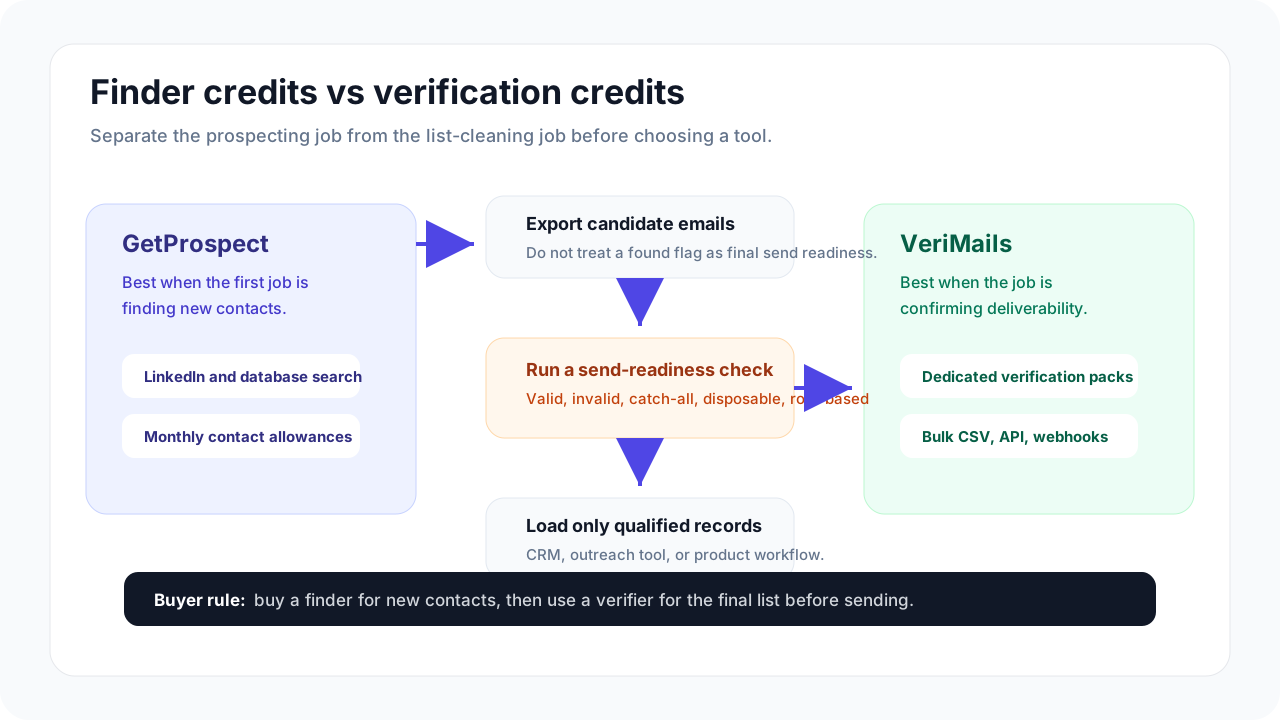
Shortlist the right workflow
If you are cleaning GetProspect exports, review real-time API verification, bulk CSV verification, and catch-all detection. If you are still comparing finders, see ContactOut, Wiza, and the lead verification workflow.
Verification Accuracy
The two tools approach accuracy from different starting points. GetProspect is a finder first, so accuracy is usually discussed in terms of how many real emails it returns from a search. The company markets 95 percent or higher accuracy and backs found emails with a credits-back guarantee, but independent benchmarks tell a more cautious story. Multiple third-party tests of between 2,500 and 5,000 contacts placed GetProspect's real-world hit rate in the low-to-mid 60 percent range, and GetProspect's own help center states the platform finds roughly 65 percent of addresses on average. That is normal behavior for a database-driven finder, but it means a meaningful slice of any sourced list is either unverifiable or unconfirmed.
VeriMails is a verification engine, so its job is different. It takes any address, no matter where it came from, and runs it through a full pipeline of syntax validation, MX record lookup, DNS checks and a live SMTP handshake with the receiving mail server. It also screens for disposable domains and role-based addresses such as info@ or sales@, then returns clear deliverability categories for the list. If your goal is to know whether the addresses already in your CRM or cold outreach list will actually deliver, that is the kind of verification depth you want, and it is exactly what a finder's built-in checks are not designed to do at scale.
In practice the two are complementary rather than identical. A team can use a finder to source contacts, then run the resulting list through VeriMails before loading it into a sending tool. Treating the finder's verified flag as the final word tends to produce more bounces than expected, because finders optimize for coverage while a dedicated verifier optimizes for delivery confidence.
Catch-all Handling
Catch-all domains are the hardest case in email verification. These domains accept any address at the SMTP layer, so a standard handshake cannot prove a specific mailbox exists. GetProspect markets a catch-all email verifier and positions it as a differentiator. That technology does add value, but GetProspect's own documentation notes that found emails split roughly evenly between verified-valid and accept-all, which means a large portion of GetProspect output is catch-all addresses that have not been individually confirmed. Accept-all addresses often pass basic checks and then bounce later, so they need to be segmented and sent carefully.
VeriMails takes a transparent approach. It performs catch-all detection: it identifies and clearly flags every address that sits on a catch-all domain, so the catch-all status is never hidden inside a generic valid result. You get an explicit label and can decide how aggressive to be, whether that means dropping those addresses, sending to them at a slower pace, or warming them up separately. The difference is mostly about clarity. GetProspect tries to resolve catch-alls and folds many of them into its valid bucket, while VeriMails surfaces the uncertainty so your team makes the call with full information. For deliverability-sensitive campaigns, knowing exactly which addresses are catch-all is often more useful than an optimistic pass.
API and Developer Experience
Both products offer an API, but they are tuned for different jobs. GetProspect's API is oriented around its finder and database, letting you programmatically search for contacts and pull verified B2B emails into your own application. That is genuinely useful if prospecting automation is what you need, and GetProspect pairs it with native CRM integrations for HubSpot, Salesforce and Pipedrive plus a Google Sheets connector.
VeriMails ships an API built specifically for verification. It is a clean REST interface with both single-email and bulk endpoints, JSON responses, and webhook support so large batch jobs can notify your system when they finish. Typical single-email responses return a clear result, which makes VeriMails practical for real-time use cases such as validating an email at the point of signup or form submission. For a developer who needs to wire verification into a registration flow, a lead-capture form or a data pipeline, VeriMails fits into the operational workflow. For a developer who needs to source contacts at scale, GetProspect's finder API is the more natural fit. The honest summary is that they solve adjacent problems, and the right API depends on whether you are finding addresses or confirming them.
Pricing and Value
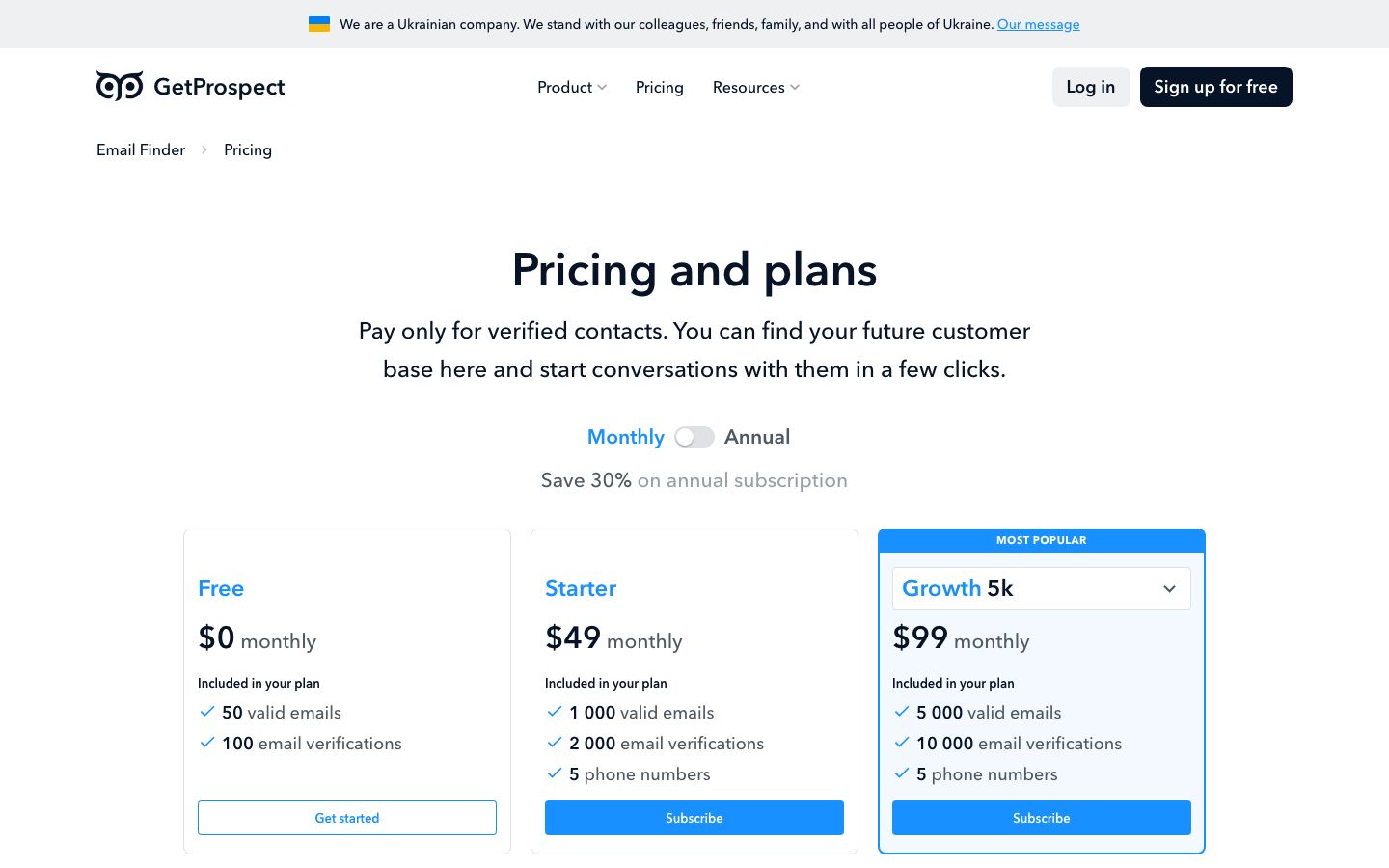
Pricing is where the two tools diverge most clearly, because they sell different things. GetProspect sells valid-email credits and verification allowances inside a monthly subscription. Its free plan includes 50 valid emails and 100 verifications per month. The Starter plan is $49 per month for 1,000 valid emails and 2,000 verifications, and the Growth plans run $99 per month for 5,000 valid emails, $199 per month for 20,000, and $399 per month for 50,000. For pure verification, GetProspect also sells add-on credits, starting around $29 for 10,000 verifications, which works out to roughly $0.0029 per check.
VeriMails sells verification credits directly, with no subscription required and no expiry. You buy a pack and use it whenever you need it.
| Credits | Price | Per email |
|---|---|---|
| 10,000 | $19 | $0.0019 |
| 25,000 | $39 | $0.00156 |
| 50,000 | $59 | $0.00118 |
| 100,000 | $99 | $0.00099 |
| 250,000 | $199 | $0.000796 |
| 500,000 | $349 | $0.000698 |
| 1,000,000 | $499 | $0.000499 |
| 2,500,000 | $999 | $0.0004 |
| 5,000,000 | $1,499 | $0.0003 |
Email Finder costs 20 credits only when VeriMails returns a verified person-level email. At the 10,000-credit pack, that is $0.038 per found email. Monthly plans start at $12.50/mo when billed yearly.
The comparison is cleanest at fixed volumes. To verify 10,000 emails, VeriMails costs $19 using its 10,000-credit pack, while GetProspect's 10,000-verification add-on is around $29. To verify 100,000 emails, VeriMails costs $99 on its 100,000-credit pack at $0.00099 per email, and GetProspect's verification add-on pricing remains higher per check at that tier. VeriMails also offers annual plans from $12.50/month when billed yearly for teams that prefer predictable billing. If you only need verification, VeriMails is consistently the cheaper option and credits do not vanish at the end of the month. If you need to source brand-new contacts, GetProspect's subscription bundles the database access that VeriMails does not try to replicate.
Who VeriMails Is Best For
- Teams that already have lists to clean. If your contacts come from a CRM export, a webform or a previous campaign, VeriMails verifies them directly without making you buy a finder subscription you do not need.
- Cost-conscious buyers at volume. At $0.00099 per email on the 100,000-credit pack and lower beyond that, VeriMails is hard to beat for pure verification, and credits never expire so nothing is wasted.
- Developers wiring verification into a product. Real-time-friendly REST responses, single and bulk endpoints and webhooks make VeriMails a good fit for signup validation and data pipelines.
- Anyone who wants catch-all transparency. VeriMails flags every catch-all domain explicitly rather than absorbing them into a generic valid result.
Who GetProspect Is Best For
- Sales teams sourcing net-new contacts. GetProspect's real strength is its B2B database and LinkedIn extension, which let you build prospect lists from scratch rather than just clean existing ones.
- Users who want finding and verification in one subscription. If you would otherwise pay for two separate tools, GetProspect bundles contact discovery with built-in verification under a single plan.
- HubSpot, Salesforce and Pipedrive users. Native CRM integrations and a Google Sheets connector make it easy to push found contacts straight into an existing sales stack.
- Prospectors who value a credits-back guarantee. GetProspect only charges for emails that pass its deliverability check and offers credit refunds, which lowers the risk of paying for dead addresses during sourcing.
Frequently Asked Questions
Why teams switch to VeriMails
“We white-labeled the API into our own platform. Our clients see our brand, VeriMails does the verification. Took our dev two days to integrate.”
— Sofia G. — CTO at Marketing Automation Agency, Spain
“Our deliverability was tanking because 6% of our list was bouncing. One bulk upload to VeriMails, removed the bad addresses, and inbox placement recovered within a week.”
— Sam R. — Growth Lead at Venture-Backed Fintech, United Kingdom
Related Comparisons
Try VeriMails Free
100 free credits on signup. No credit card required. See why teams switch to VeriMails.
Start Free