Email Verification for Shopify Stores
A Shopify order is only as reachable as the email address attached to it. When that address is mistyped, disposable, or stale, confirmations fail, carts stay lost, and future campaigns pay for the bad data.
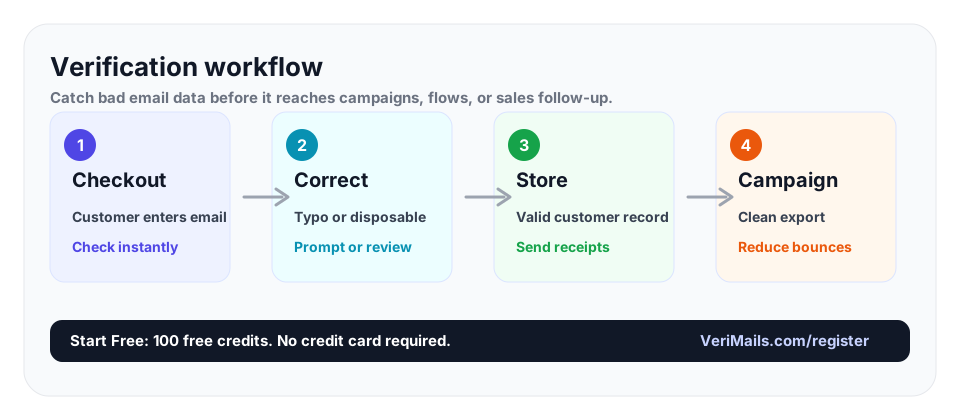
Verify Shopify emails at checkout, account creation, and before campaign exports. Use real-time API checks for new orders and bulk verification for customer lists before major promotions.
Why Shopify Email Quality Matters
Shopify stores rely on email for the most sensitive parts of the customer relationship. Receipts, order confirmations, shipping updates, delivery problem messages, return instructions, review requests, abandoned-cart reminders, and product launch emails all start from the same field: the customer email address.
When the email is wrong, the store still accepts the order. The payment goes through, inventory moves, and fulfillment starts. But the customer never receives a confirmation. Support gets the ticket. The abandoned-cart flow cannot recover the shopper. The future campaign list grows with an address that will bounce later. A simple typo can create operational work and weaken deliverability.
Verification turns the email field into a quality gate. It catches malformed addresses, fake domains, disposable inboxes, and addresses the receiving server will not accept. For the full e-commerce view, pair this Shopify workflow with the e-commerce email verification guide.
Where to Verify in a Shopify Store
The highest-value point is checkout. If you can verify while the shopper is still entering their email, a typo can be corrected before the order is created. That protects receipts, shipping updates, and abandoned-cart flows. The next best points are account creation, newsletter popups, lead magnets, wholesale inquiry forms, and post-purchase survey captures.
You should also verify existing customer exports before a campaign. Shopify stores often connect to Klaviyo, Mailchimp, Omnisend, or another ESP. Every export carries address decay from old orders, migrations, and inactive customers. A bulk verification run before a launch removes invalid addresses before they touch the ESP and protects the sender reputation you need for revenue email.
If your store pushes Shopify customers into Klaviyo, read the Klaviyo verification guide as the next step. If your store uses Mailchimp instead, the Mailchimp integration workflow shows how to keep that list cleaner too.
How to Handle Each Verification Result
A verified-valid result should move through checkout without friction. Do not slow down a good shopper. An invalid result should trigger a short correction prompt while the customer is still present. Keep the prompt specific and calm: ask them to check the email address, and do not make them re-enter the whole checkout form.
Disposable addresses need a policy. Some stores block them for discount abuse and account creation, while others allow the order but exclude the profile from marketing. Catch-all addresses should not be treated as confirmed. They may still receive mail, but the exact mailbox could not be verified, so hold them out of high-risk sends until you have more engagement data.
This is where verification is better than guessing. You can decide what happens to each result type before launch, then let the system apply that rule consistently at scale.
How VeriMails Fits Shopify Workflows
For real-time checks, call the VeriMails API when an email is captured in checkout, account creation, or a custom form. The response returns a clear status your storefront or backend can use: accept the email, ask for a correction, block a disposable address, or route a risky case for review. Developers can add this without changing the rest of the order flow.
For existing lists, export Shopify customers as a CSV and run bulk verification before the next campaign. The results file marks every address, so you can suppress invalid and disposable records before importing into your ESP. This is especially useful before Black Friday, product launches, holiday campaigns, and win-back sends, when bounce pressure is expensive.
Pricing fits both modes. VeriMails credits start at $19 for 10,000 verifications, and annual plans start at $12.50/month when billed yearly. Every new account gets 100 free credits with no credit card required. If you also need to compare providers before adding the check, see the 2026 email verification tools guide.
Quick Decision Table
| Shopify moment | What can go wrong | Best check |
|---|---|---|
| Checkout | Mistyped emails block receipts and shipping updates. | Real-time API verification with correction prompt. |
| Newsletter popup | Discount seekers use disposable or fake addresses. | Disposable detection before the subscriber syncs. |
| Customer export | Old orders include stale addresses. | Bulk verification before ESP import. |
| Abandoned cart | Recovery emails bounce when the captured address is wrong. | Verify when the email is first entered. |
| Wholesale form | Bad B2B contacts waste follow-up time. | API verification before CRM routing. |
- Verify checkout emails before the order confirmation depends on them.
- Block or review disposable addresses on discount and signup forms.
- Clean customer exports before major campaign imports.
- Keep catch-all addresses out of your safest launch segment.
- Use one verification policy across Shopify, Klaviyo, Mailchimp, and CRM syncs.
Frequently Asked Questions
Related Articles
Start with Clean Data
100 free credits on signup. No credit card required. Put the advice into practice today.
Start Free