VeriMails vs VerifyForge
VerifyForge is a validation API and widget product with monthly credit plans, form-check controls, CSV upload, bulk validation, and webhook notifications on higher plans. VeriMails is built for teams that need to clean email lists they already have, keep verification cost predictable, and separate valid, invalid, catch-all, disposable, role-based, and uncertain records before a campaign or CRM import.
Updated May 21, 2026
Quick Verdict
At a Glance
| Question | VeriMails | VerifyForge |
|---|---|---|
| What do you need? | Clean an existing list or verify emails through a direct API. | Add validation to forms, apps, or smaller API-driven flows. |
| Best starting point | You have a CSV, CRM export, lead file, or signup list. | You want to validate emails as users submit them. |
| Pricing style | Verification credits with no monthly software plan required. | Monthly plans, 250 free credits, and a credit calculator section. |
| Bulk work | Bulk upload, segment, export, and reuse credits across lists. | CSV upload and bulk validation, with 100-per-request listed on pricing cards. |
| Form controls | Use the API where direct checks are needed. | Widget configuration can allow or block valid, risky, invalid, unknown, free, role-based, and disposable emails. |
| Catch-all handling | Keep catch-all and uncertain records separate from the safest export. | Useful for validation flows, but not centered on campaign-ready list segmentation. |
What the Products Show
VerifyForge's public pages position the product around email validation for developers and marketers, with an API, SDKs, CSV upload, widget configuration, and pricing cards. VeriMails is narrower: it helps teams clean the email data they already have and decide what should be sent, removed, or reviewed.

Pricing and Credit Planning
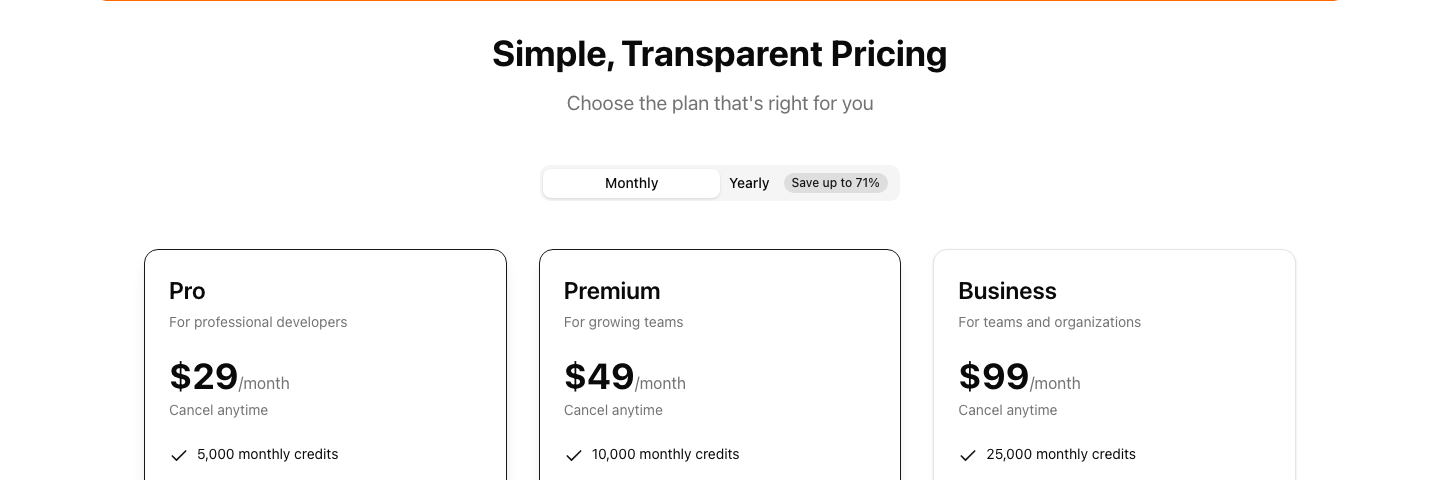
VerifyForge's pricing page lists Pro at $29 per month for 5,000 monthly credits, Premium at $49 per month for 10,000 monthly credits, and Business at $99 per month for 25,000 monthly credits. It also promotes 250 free credits for new users and says credits never expire in its credit calculator section. Because the page is built around plans, teams should confirm the current plan details at purchase time.
VeriMails pricing is simpler when the job is list cleaning. You buy verification credits and spend them on email checks. There is no need to buy a monthly software plan just to upload a CRM export, clean a lead vendor file, or verify a newsletter list.
| Need | VeriMails | VerifyForge | What this means |
|---|---|---|---|
| Test the product | 100 free signup credits. | 250 free credits promoted on public pages. | Both allow a small trial before purchase. |
| 10,000 checks | $19 credit pack. | $49/month Premium plan lists 10,000 monthly credits. | VeriMails is lower-cost for a verification-only file. |
| 25,000 checks | $39 credit pack. | $99/month Business plan lists 25,000 monthly credits. | The plan model may be useful if the team needs Business features. |
| Ongoing API validation | Use direct verification credits. | Choose the plan that matches the app's usage and features. | The better choice depends on whether list cleaning or form validation is primary. |
| Campaign cleanup | Clean, segment, and export the final send list. | Can validate emails, but the workflow is less list-cleaning focused. | Use the product built around the actual job. |
VeriMails Credit Pricing
| Credits | VeriMails Price | Price per Email |
|---|---|---|
| 10,000 | $19 | $0.0019 |
| 25,000 | $39 | $0.00156 |
| 50,000 | $59 | $0.00118 |
| 100,000 | $99 | $0.00099 |
| 250,000 | $199 | $0.000796 |
| 500,000 | $349 | $0.000698 |
| 1,000,000 | $499 | $0.000499 |
| 2,500,000 | $999 | $0.0004 |
| 5,000,000 | $1,499 | $0.0003 |
VeriMails credits never expire. Email Finder costs 20 credits only when VeriMails returns a verified person-level email. At the 10,000-credit pack, that is $0.038 per found email. Monthly plans start at $12.50/mo when billed yearly.
API, Widget, and Bulk Use Cases
VerifyForge is strongest when a team wants validation inside a website, signup flow, or application. Its public documentation includes widget configuration for email inputs and lets teams decide how to treat valid, risky, invalid, unknown, free-provider, role-based, and disposable addresses. Its public pages also mention SDKs for Python and TypeScript, CSV upload, and validating up to 100 emails in a bulk request.
That is different from cleaning a finished list. A form widget helps at the point of capture, but sales and marketing teams still need a way to clean exported lists, old CRM records, event attendees, partner files, and prospect lists before they go into a campaign. VeriMails is built for that second step.
| Workflow | Better fit | Why |
|---|---|---|
| Block poor-quality signup emails in a form | VerifyForge | Its widget settings are designed for form validation controls. |
| Clean a 40,000-row CRM export | VeriMails | The job is bulk list hygiene, not only one email at a time. |
| Validate email fields inside a product | Either | Compare price, response detail, and the way results will be used. |
| Prepare a cold outreach sequence | VeriMails | Valid, invalid, catch-all, disposable, role-based, and uncertain groups need campaign decisions. |
| Use webhook notifications from the verifier | VerifyForge | VerifyForge lists webhook notifications on Premium and Business. |
Catch-All and Uncertain Records
For list cleaning, the most important question is not only whether a tool can return a validation result. The question is what your team can safely do with that result. Catch-all and uncertain records should not be blended into the cleanest export just because they are not clearly invalid.
VeriMails keeps those records separate so teams can suppress them, review them, or use a more conservative send path. That matters for B2B lists, international campaigns, and CRM data that has been touched by multiple vendors or forms. VerifyForge is useful for validation and form controls, but its public positioning is less focused on campaign-ready segmentation.
| Email group | Recommended action | Why it matters |
|---|---|---|
| Clearly valid | Use after dedupe and consent checks. | This is the safest group for normal sending. |
| Invalid | Remove before upload. | These records create avoidable bounce risk. |
| Disposable | Suppress or route to review. | Temporary addresses are usually poor campaign targets. |
| Role-based | Review based on campaign type. | Shared addresses can be legitimate, but they may not fit every outreach motion. |
| Catch-all or unknown | Keep separate from the safest export. | The record may need a lower-risk send path or manual review. |
Localized and International Lists
If your team runs campaigns by country, language, or region, verification is only one layer of the workflow. Keep consent, opt-out, suppression, and data-retention rules in the CRM or marketing platform. Then use verification to clean each regional export before it is sent.
A practical localization workflow is simple: segment the audience first, verify each segment separately, and keep uncertain records out of the main send group. This helps prevent one market's older or riskier data from affecting the performance of another market's campaign.
| Localized use case | Recommended approach | Tool fit |
|---|---|---|
| Country-specific campaign | Verify the final country segment before sending. | VeriMails for the cleaning step. |
| Signup form by region | Validate emails at capture, then clean exported segments later. | VerifyForge at capture, VeriMails before send. |
| Multilingual newsletter import | Keep language segments separate and remove invalid records before import. | VeriMails. |
| Old international CRM data | Run a fresh list cleanup before enrichment or outreach. | VeriMails. |
How Teams Can Use Both
Some teams do not need to choose only one category. A website or app can use a form validator at the point of capture, then a list-cleaning product later when contacts are exported for campaigns, enrichment, or CRM cleanup. The important part is assigning each tool to the right point in the lifecycle.
For example, VerifyForge can help reject disposable or role-based addresses in a signup form if that is the policy your team wants. Later, VeriMails can clean the full audience before a newsletter, sales sequence, partner campaign, or regional launch. That second pass catches old records, vendor-sourced addresses, imported contacts, and catch-all domains that did not come through the original form.
| Stage | What to do | Why it helps |
|---|---|---|
| Signup or lead form | Validate obvious bad, disposable, or unwanted address types before submission. | Cleaner data enters the system from the start. |
| CRM or audience export | Run the final file through VeriMails before upload or send. | Older and imported records get a fresh quality check. |
| Campaign preparation | Send clearly valid emails first; keep catch-all and uncertain records separate. | The send list stays easier to control and review. |
| Regional launch | Verify each country or language segment separately. | One region's data quality does not mask another region's risk. |
Which Tool Fits Your Team?
Choose VeriMails if...
- You already have email addresses and need to clean them before sending.
- You want verification credits that map directly to list size.
- You need catch-all, disposable, role-based, invalid, and uncertain records separated for review.
- You are cleaning CRM exports, event lists, newsletter imports, lead vendor files, or Apollo-style exports.
Choose VerifyForge if...
- You want email validation inside a website form or app flow.
- You need widget controls for free-provider, role-based, disposable, risky, invalid, and unknown states.
- Your usage fits a monthly credit plan and you want its plan features.
- Webhook notifications are part of the validation workflow you want to build.
Sources Used for This Comparison
This comparison uses public VerifyForge and VeriMails pages. Pricing, plan packaging, and feature labels can change, so confirm the current purchase page before buying.
Verification Accuracy
VerifyForge can be useful when you need a small validation API or a lightweight checker. VeriMails is built for the full list-cleaning job: single checks, bulk CSV jobs, and exports that your sender can use immediately.
The practical accuracy test is simple: check a real sample, compare valid, invalid, catch-all, disposable, and unknown rows, then send only the confirmed valid segment. Guessing on uncertain mailboxes is what creates bounce risk.
Who VeriMails Is Best For
Choose VeriMails when verification is the job and you want the result before the send.
- You already have a list and need to clean it before a campaign.
- You want prepaid verification credits that never expire.
- You need both real-time API checks and bulk cleanup from the same credit balance.
Who VerifyForge Is Best For
Choose VerifyForge when its broader product strengths match the job you are buying for.
- Choose VerifyForge when you need its specific API bundle, free checker, hosted form, or validation endpoint.
- Choose it for small one-off checks if the pricing and limits fit your usage.
- Choose it when its response format already matches an existing integration you do not want to change.
Frequently Asked Questions
Why teams switch to VeriMails
“We process 5M verifications a month across multiple products. The API handles it without rate limit issues and the bulk pricing makes our unit economics work.”
— Rachel M. — VP Engineering at Data Company, United States
“Our marketing team used to blame sales for bad leads. Turned out 18% of our lead database had invalid emails. VeriMails fixed the data, fixed the argument.”
— Richard T. — VP Marketing at Mid-Market Software Company, United States
Related Comparisons
Compare With Your Own List
Start with 100 free credits. Verify a sample list, inspect catch-all handling, and compare the cost at your expected volume.
Start Free