VeriMails vs QuickEmailVerification
Both VeriMails and QuickEmailVerification can verify existing email lists. The main differences are pricing, free usage, API workflow, and how each tool helps teams separate safer addresses from catch-all, disposable, role-based, invalid, and uncertain records before a campaign or CRM import.
At a Glance
| Question | VeriMails | QuickEmailVerification |
|---|---|---|
| Best starting point | A CSV, CRM export, signup list, campaign list, or API check | A list, signup form, API integration, or small daily verification need |
| Main job | Verify existing emails and export usable, invalid, catch-all, risky, and uncertain groups | Verify existing emails through a web app, REST API, integrations, and bulk list checks |
| Pricing style | One-time credit packs plus monthly plans | One-time persistent credits plus daily credit subscriptions |
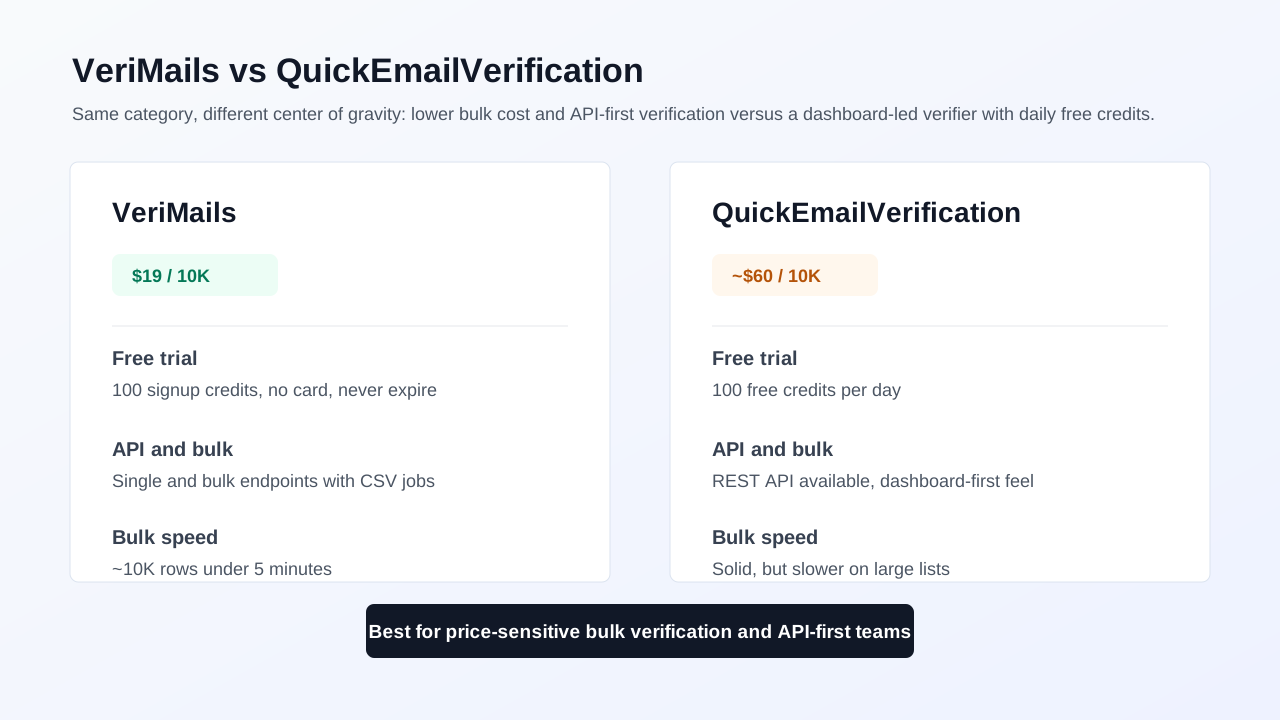
| Free usage | 100 signup credits | 100 free credits per day, shown as 3,000 credits per month |
| 10,000 checks | $19 one-time credit pack | $60 one-time credit pack on the current pricing page |
| 100,000 checks | $99 one-time credit pack | $320 one-time credit pack on the current pricing page |
| API use | Single and bulk verification endpoints | REST and JSON API with SDK examples and documented response fields |
| Catch-all handling | Catch-all records stay separate for review before sending | API response shows `accept_all` plus a field that helps identify safer sends |
What the Products Show
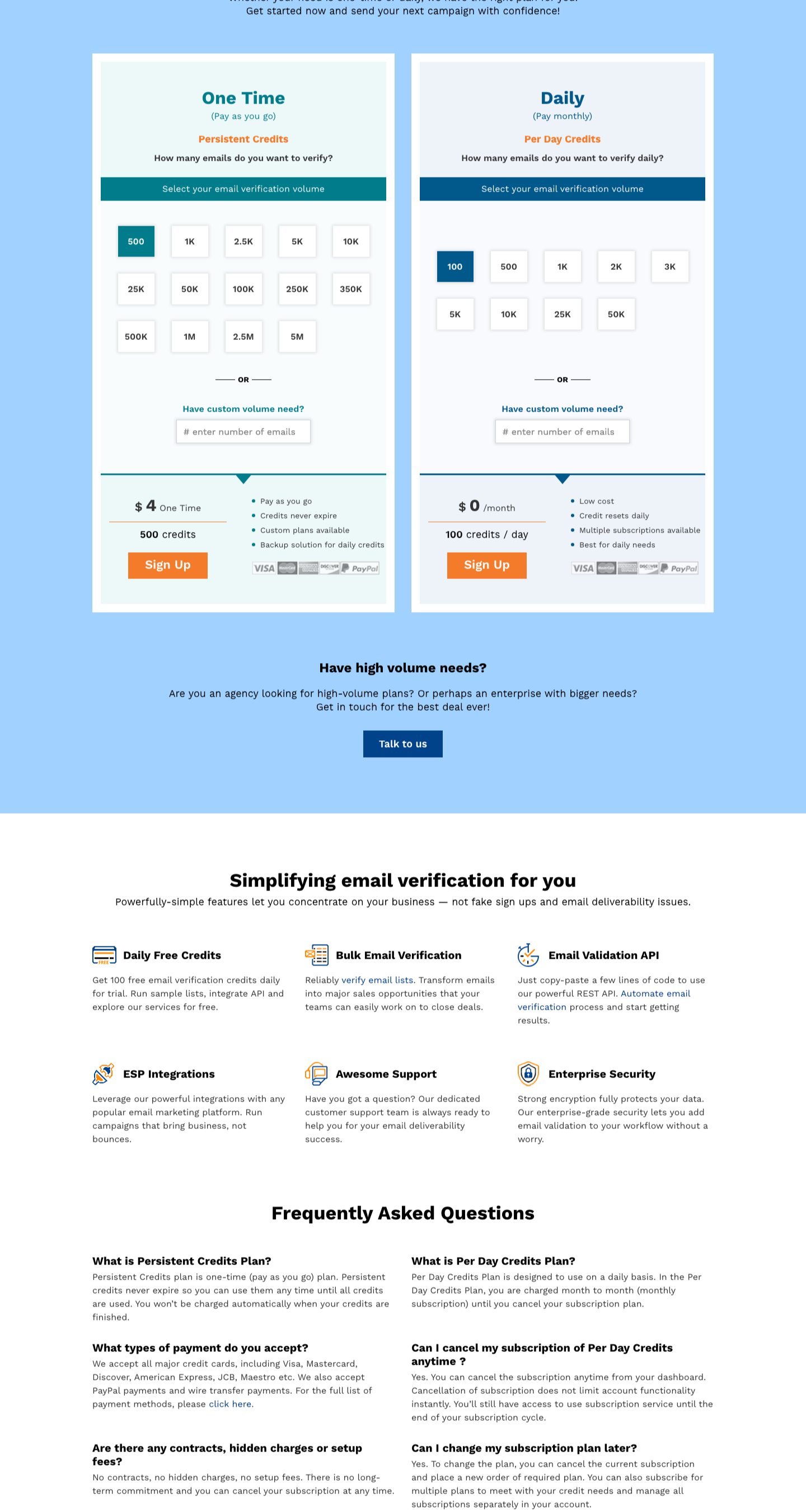
QuickEmailVerification's pricing page shows two paid paths: one-time persistent credits and daily credit plans. It also highlights 100 free verification credits per day, bulk email verification, an email validation API, ESP integrations, support, and security.
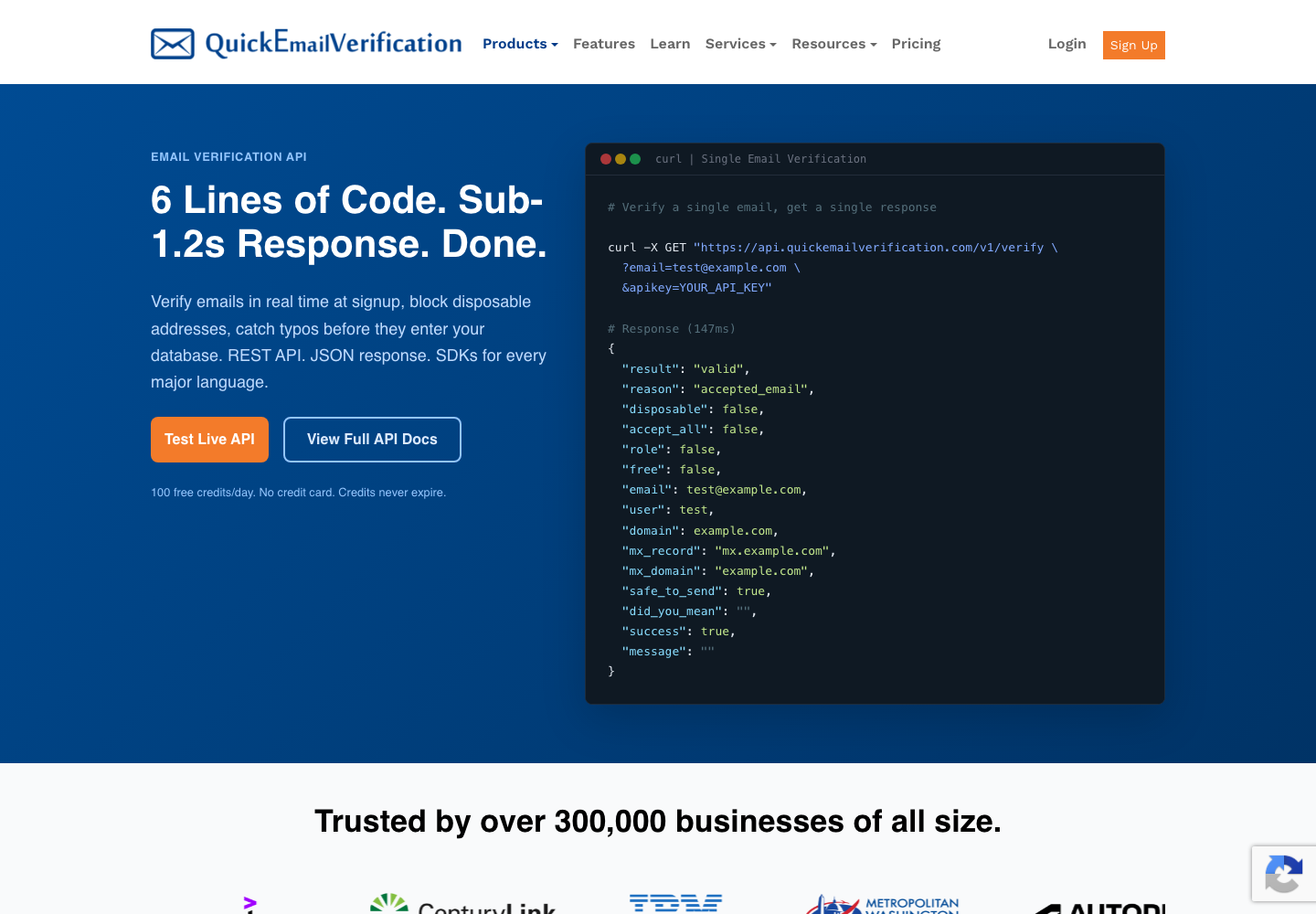
Its API page is unusually concrete. It shows REST and JSON examples, 100 free credits per day, credits that do not expire, and response fields including `result`, `reason`, `disposable`, `accept_all`, `role`, `free`, `safe_to_send`, and `did_you_mean`. That gives teams a usable way to separate safer addresses from categories that need review.
Pricing and Credit Model
QuickEmailVerification's pricing page lists 100 free verification credits daily. For one-time credits, the page lists $4 for 500 credits, $60 for 10,000 credits, $200 for 50,000 credits, $320 for 100,000 credits, $900 for 500,000 credits, and $1,350 for 1,000,000 credits. It describes those one-time credits as persistent credits that do not expire.
VeriMails lists one-time verification credit packs starting at $19 for 10,000 credits and $99 for 100,000 credits. That pricing is easier to compare when the job is simply cleaning an existing list before outreach or CRM import.
| Volume | VeriMails listed price | QuickEmailVerification listed price | Practical read |
|---|---|---|---|
| Small sample | 100 signup credits | 100 free credits per day | QuickEmailVerification is generous for steady small daily checks. |
| 10,000 emails | $19 | $60 | VeriMails is simpler when a team needs one list cleaned. |
| 50,000 emails | $59 | $200 | Compare export needs and review workflow before buying. |
| 100,000 emails | $99 | $320 | The difference matters for recurring list hygiene or agency work. |
| 1,000,000 emails | $499 | $1,350 | High volume teams should also confirm turnaround, support, and export format. |
Pricing and plan selectors were checked during the May 21, 2026 update. Confirm current checkout terms before purchasing.
VeriMails Credit Pricing
| Credits | VeriMails Price | Price per Email |
|---|---|---|
| 10,000 | $19 | $0.0019 |
| 25,000 | $39 | $0.00156 |
| 50,000 | $59 | $0.00118 |
| 100,000 | $99 | $0.00099 |
| 250,000 | $199 | $0.000796 |
| 500,000 | $349 | $0.000698 |
| 1,000,000 | $499 | $0.000499 |
| 2,500,000 | $999 | $0.0004 |
| 5,000,000 | $1,499 | $0.0003 |
VeriMails credits never expire. Email Finder costs 20 credits only when VeriMails returns a verified person-level email. At the 10,000-credit pack, that is $0.038 per found email. Monthly plans start at $12.50/mo when billed yearly.
API and Workflow
QuickEmailVerification is a strong API option for teams that like its response model. Its API page shows REST requests, JSON responses, SDK references, a test area, and fields that help teams identify disposable addresses, role-based addresses, accept-all domains, typo suggestions, and safer sends.
VeriMails is a cleaner fit when the same account needs both list cleanup and API checks in one verification-focused workflow. Teams can upload files, verify lists, review result groups, export records, and use API checks where signup forms or CRM workflows need real-time validation.
Catch-All and Risky Records
A catch-all or accept-all domain may accept mail broadly even when the exact mailbox is uncertain. That makes catch-all handling important for cold outreach, recruiting, newsletters, and CRM cleanup.
QuickEmailVerification's API page shows an `accept_all` field and a `safe_to_send` field. The page explains that a valid address is not automatically risk-free, because catch-all, role-based, and accept-all records may still require a more cautious decision. VeriMails also separates catch-all and risky records so teams can review them before sending.
| Result group | Why it matters | Recommended action |
|---|---|---|
| Valid and ready | Best candidate for normal sending after consent and suppression checks | Keep in the ready-to-send group |
| Catch-all / accept-all | The domain accepts broadly, so the exact mailbox is less certain | Review separately or route to a cautious workflow |
| Disposable | Temporary addresses often create low-quality contacts | Suppress from CRM and campaign imports |
| Role-based | Shared inboxes can behave differently from person-level contacts | Review based on campaign type |
| Invalid or unknown | Higher bounce or uncertainty risk | Remove, recheck later, or keep out of the next campaign |
Bulk List Cleaning
QuickEmailVerification's bulk verifier page emphasizes file upload, bulk checks, integrations, and list cleaning before campaigns. It is a sensible choice if your team already uses its interface or wants to combine daily credits with occasional file checks.
VeriMails is more direct when the task is a priced bulk cleanup: upload a file, verify records, review catch-all and other risky groups, and export a safer list. For teams cleaning a campaign list, customer database, event export, or CRM segment, the value is in quickly getting from raw addresses to clear action groups.
| If your team needs... | VeriMails path | QuickEmailVerification path |
|---|---|---|
| Daily small checks | Use signup credits, then buy a pack when needed | Use the 100 daily free credits |
| A one-time campaign cleanup | Buy the closest one-time credit pack and verify the file | Use one-time persistent credits if the existing workflow fits |
| Form validation | Use API checks where the signup or lead form needs email quality decisions | Use the REST API if your team wants its response fields |
| Review risky records | Separate catch-all, disposable, role-based, invalid, and uncertain groups | Use `safe_to_send`, `accept_all`, `role`, and `disposable` fields in your rules |
How Teams Can Compare Both
Because QuickEmailVerification and VeriMails solve similar jobs, the best comparison is a real sample. Export a mixed list with work emails, free inboxes, role addresses, likely typos, old contacts, and known risky domains. Run the same file through both tools, then compare how many records land in ready, review, suppress, and recheck groups.
That test will show more than a headline accuracy claim. It tells your team whether the labels are easy to understand, whether exports fit your CRM, and whether the pricing model matches how often you clean lists.
Which Tool Fits Your Team?
| Choose... | When this is true | Why |
|---|---|---|
| VeriMails | You need to clean a list now and want lower listed pricing at common volumes | The 10,000 and 100,000 credit packs are priced for simple list-cleaning jobs. |
| VeriMails | You want catch-all and risky records held out for review before outreach | The workflow is built around verification result groups and export decisions. |
| QuickEmailVerification | You need a steady stream of small free checks | Its 100 daily free credits are useful for light ongoing testing. |
| QuickEmailVerification | Your app or team already prefers its API response format | The public API page clearly shows fields for disposable, role, accept-all, typo, and safer-send decisions. |
| Test both | The decision affects a large list or recurring workflow | A shared sample shows the actual labels, exports, and cost impact for your data. |
Sources Used for This Comparison
Verification Accuracy
Both VeriMails and QuickEmailVerification can help reduce bad addresses before a campaign. The difference is how clearly the result fits your next send: VeriMails keeps valid, invalid, disposable, role-based, catch-all, and unknown rows separate for decision-making.
Use a recent sample from your own CRM, not a perfect test list. The addresses that matter are the ones you plan to mail this week: old leads, imported contacts, role inboxes, catch-all domains, and records from mixed sources.
Who VeriMails Is Best For
Choose VeriMails when verification is the job and you want the result before the send.
- You already have a list and need to clean it before a campaign.
- You want prepaid verification credits that never expire.
- You need API and CSV verification without paying for a larger sales platform.
Who QuickEmailVerification Is Best For
Choose QuickEmailVerification when its broader product strengths match the job you are buying for.
- Choose QuickEmailVerification when its existing dashboard, integrations, or deliverability features already fit your workflow.
- Choose it when you value that specific result model or account setup more than lower self-serve verification pricing.
- Choose it when your team has already standardized on its exports, API fields, or support process.
Frequently Asked Questions
Why teams switch to VeriMails
“We tested VeriMails at 2M credits before committing. Accuracy matched ZeroBounce and Bouncer. Price didn't. Easy decision.”
— Ben L. — Head of Data at Marketing Technology Company, United Kingdom
“We run monthly newsletter sends to 200K subscribers. Quarterly verification keeps our Mailchimp sender score healthy. Takes 30 minutes start to finish.”
— Ben A. — Growth Marketing Lead at Media Company, United States
Related Comparisons
Verify a Real Sample
Start with 100 free credits. Clean a sample list and review catch-all records before the next campaign.
Start Free