Email Verification Built for IT and MSPs
An alert that bounces is an outage nobody sees. Verify your client contacts with VeriMails so monitoring alerts, maintenance windows, and incident updates always reach the right inbox.
The short version: verify first, then send.
When a client alert bounces, an outage can go unnoticed. Verify client contacts before onboarding, maintenance windows, and incident updates so the addresses your tools depend on are still reachable.
Why IT teams and MSPs need email verification
For a managed service provider, email is not marketing. It is the channel that carries time-sensitive operational truth to clients.
When an MSP sends an email, it usually means something important is happening. A monitoring threshold has been crossed, a maintenance window is scheduled, a security event needs the client's attention, or a ticket is waiting on their approval. These are not campaigns you can afford to have land in a promotions tab or bounce unnoticed. Yet the contact data behind them is surprisingly fragile. Client staff change roles and leave companies, addresses are mistyped during onboarding, and shared mailboxes get set up and torn down without anyone telling you. A monitoring alert sent to a departed employee fails in total silence as a hard bounce, and you only discover the gap when a client asks why nobody warned them about an outage. Verifying client contacts through bulk verification confirms that the address still works before your tooling depends on it for an alert that genuinely matters.
Alerts must reach a real inbox
RMM and monitoring tools fire alerts when a metric crosses a threshold. If the client contact address is wrong, the alert fails silently and the issue goes unnoticed.
Client staff turn over
Contacts leave the companies you support. A maintenance notice sent to a departed employee never reaches anyone, and you only find out when a client asks why they were not warned.
Incident updates cannot bounce
During an outage or a security event, clients depend on your status updates. A bounced incident email erodes trust at the exact moment trust matters most.
Ticketing notifications depend on it
PSA and ticketing systems email clients on every status change. A wrong address means a client never sees a resolution or a request for approval.
Your sending domain is at stake
Bounces from stale client contacts hurt the reputation of your sending domain. Once that drops, even your good alerts risk landing in a client's spam folder.
Onboarding sets the foundation
Client contact data enters your systems during onboarding. Verifying it at that stage means every later alert and notification starts from an address you know works.
How VeriMails helps IT teams and MSPs
Verification fits the tools and workflows you already run.
Bulk-verify client contacts
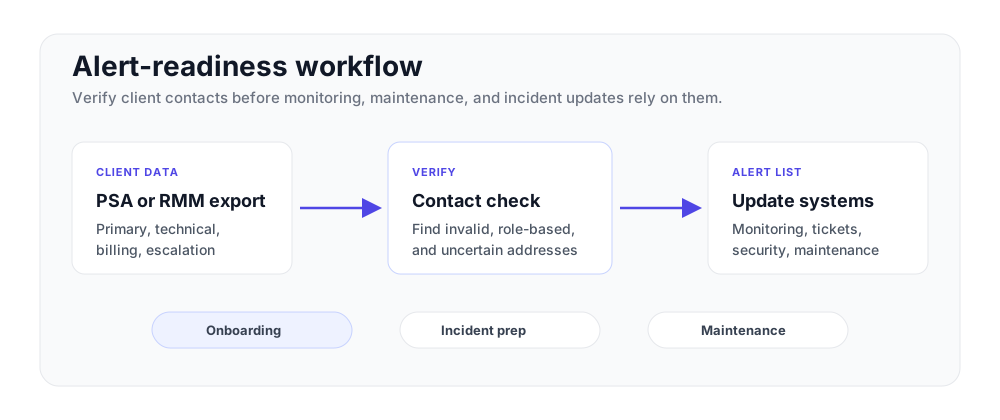
Export a CSV from your PSA, RMM, or ticketing system. VeriMails auto-maps the email column and verifies the file as a background job.
Verify in your automation
Call the REST API when a contact is added or updated during onboarding, so a bad address is flagged before it lands on an alert distribution list.
Spot role-based addresses
Role-based detection flags shared mailboxes like helpdesk@ or it@. You can decide whether a shared address or a named contact should receive critical alerts.
Catch-all detection
Many corporate client domains accept every address. VeriMails flags catch-all domains so you know which client contacts carry delivery uncertainty.
Deep, accurate checks
Each address gets syntax, MX, DNS, and a live SMTP handshake, plus catch-all, disposable, and role-based detection as part of the verification result.
API-ready verification
The API is designed for inline contact checks during onboarding and provisioning workflows.
Make contact verification part of service readiness
MSPs do not need another manual checklist buried in a ticket. The useful pattern is simple: verify contacts when a client is onboarded, audit them before planned maintenance, and recheck key notification lists after staff changes.
Alert-readiness checklist
- Verify primary, billing, technical, and escalation contacts during onboarding.
- Review role-based mailboxes before assigning them to critical alerts.
- Recheck maintenance and incident distribution lists before planned work.
- Update corrected addresses in the PSA, RMM, or ticketing source of truth.
| Moment | Verification step | Outcome |
|---|---|---|
| Client onboarding | Use the API or a CSV upload before contacts enter alert lists. | Monitoring, billing, and escalation contacts start clean. |
| Maintenance window | Reverify the notification segment before the announcement send. | Planned work notices reach the people who need to approve or prepare. |
| Incident response | Audit critical distribution lists on a scheduled cadence. | Outage and security updates are less likely to disappear into dead inboxes. |
How it works
From a client contact export to a verified, alert-ready list in minutes.
Export client contacts
Pull a CSV from your PSA, RMM, or ticketing system. Any file with an email column works.
Upload and verify
Drop the file into VeriMails. The email column maps automatically and the file runs as a background verification job.
Update your alert lists
Flag invalid contacts for follow-up with the client, update your distribution lists, and trust that alerts reach a working inbox.
Pricing that fits a managed service
Verification starts at $0.0019 per email, so keeping every client contact list verified across your book of business stays inexpensive. A 10,000 credit pack is $19, and credit packs scale up to 5 million credits for $1,499. If you verify contacts on an ongoing basis through the API, annual plans start at $12.50/month when billed yearly. Every new account gets 100 free credits with no credit card, and credits never expire, so you can verify on your own onboarding cadence. See full pricing →
We had a maintenance notice quietly bounce because a client contact had left months earlier. Now we verify every client contact list, and our alerts reach a real person instead of disappearing.Alan K. — MSP Service Delivery Lead, United States
Frequently asked questions
Everything IT teams and MSPs need to know about email verification.