Email verification features for the way teams actually use lists
VeriMails gives product teams, sales teams, marketers, agencies, and data operators one place to verify emails before they enter forms, CRMs, campaigns, enrichment workflows, or customer databases.
{
"status": "valid",
"safe_to_send": true,
"mx_found": true
}
Email verification is rarely a standalone task. A signup form needs to reject obvious bad addresses before they become support tickets. A sales team needs to clean a CSV before upload. A marketing team wants to protect campaign quality before a send. A data team may need a repeatable API path for controlled verification jobs. The features hub is designed to help you choose the right entry point without having to translate between separate products.
The platform map below shows the main paths. Start with Email Verification API when checks happen inside software. Use Bulk Verification when the source is a CSV list. Review Catch-All Detection when a domain accepts broadly and needs more careful handling. Use Email Finder when you start from a person and company instead of an address. Then use pricing to plan credits and docs to connect the workflow.
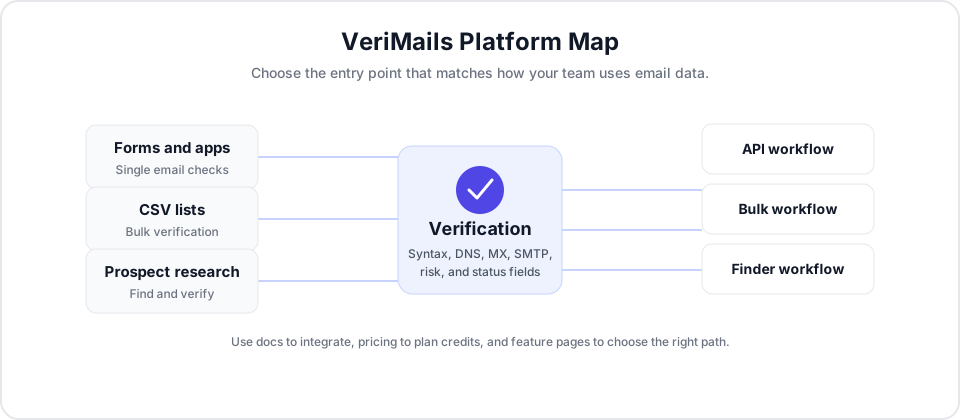
Choose the feature that matches the source of the email
VeriMails keeps the product surface simple: different ways to submit data, one verification result model, and clear paths for exporting or automating the outcome.
Email Verification API
Use the API for signup forms, lead capture, onboarding, enrichment jobs, internal tools, and any workflow where software needs to decide what to do with an address.
Explore the API ->Bulk CSV Verification
Upload a CSV, map the email column, verify the list, and download results for outreach, CRM cleanup, marketing review, or data preparation.
Clean a CSV list ->Catch-All Detection
Identify domains that accept mail broadly, then separate cleaner addresses from addresses that deserve a different review or sending policy.
Review catch-all handling ->Email Finder
Start with a person and company, find a likely business email, and verify the result before you add it to prospecting or enrichment workflows.
Find verified emails ->Documentation
Use endpoint references, authentication guidance, error handling, rate limits, and examples when you are ready to wire VeriMails into your stack.
Open docs ->Credits and Plans
Estimate usage across single checks, CSV rows, batch requests, and finder work before choosing the credit amount that fits your workflow.
View pricing ->How to decide where to start
The best entry point depends on when the email appears, who owns the workflow, and what has to happen after verification.
Use the API when an email is typed into a form or created by an application. Your system can store the returned status and decide whether to accept, review, or reject the record.
Use bulk verification when the emails already live in a spreadsheet, CRM export, lead list, event file, or marketing list that needs review before use.
Use catch-all detection when a domain-level response makes a mailbox look less certain. This helps teams avoid treating every address as equally ready.
Use finder when you know the person and company but do not yet have a reliable email. Verification keeps the found address tied to the same decision model.
A practical operating model for cleaner email data
Most teams get better results when verification sits before the handoff that makes an email operational. That handoff might be a CRM import, a scheduled campaign, a signup event, a sales sequence, or a data delivery. VeriMails is built to support that checkpoint without requiring every team to work the same way.
Preserve context
Bulk CSV workflows let teams return verification results to the same operational context that created the list. That makes it easier to filter, segment, or re-import without losing the original row data.
Automate carefully
API workflows are strongest when the calling system stores the verification result alongside the email. That gives product, support, and operations teams a shared status to reference later.
Review uncertain addresses
Not every address should produce a simple yes-or-no decision. Catch-all and other ambiguous results can be routed to a review segment, a different campaign, or a lower-priority queue.
Feature questions
These are the common decisions teams make before they choose a VeriMails workflow.
What can I do from this hub?
You can move from the hub into API verification, bulk CSV cleaning, catch-all review, email finding, pricing, and documentation. It is meant to route teams to the workflow that matches their source data.
Should I use API or bulk verification?
Use API verification when a live system needs to check one email or a controlled batch. Use bulk verification when a list already exists and needs to be cleaned before import, outreach, or campaign use.
Where does catch-all detection fit?
Catch-all detection fits after the basic address and domain checks, because it helps explain why an address may be less certain even when the domain accepts mail broadly.
How should teams plan usage?
Start with the number of emails that need verification, then include batch requests, CSV rows, and finder searches. Review pricing before production use and keep the docs close during implementation.
Start with the workflow you already have.
Upload a CSV, verify one email, or connect the API. The same verification layer can support the first cleanup job and the production workflow that follows it.
Start Free